• Gift Certificate
  • Track Order
  • Help
  • Feedback [+]
  • Best Selection, Price & Service. Guaranteed.
    • 18 Month Financing For May

      Special 18 Month Financing For The Whole Month Of May

      Here at Musician's Friend, we know there are a lot of challenges to finding the right gear at the right price. That's why we do all we can to help make sure our customers have a variety of options at prices they can afford. It's with this in mind that we offer special financing options to help fund the gear you need to make the music you love.

      Click the link below to find out how you can take advantage of our special financing offers. It's fast, easy and secure, and once approved, you can begin shopping at MusiciansFriend.com right away.

      Apply for a Musician's Friend Credit Card Today

    • Memorial Day Sales Event

      We’re pulling out all the stops for one of our biggest events of the year! Tons of deals across all categories will be happening through Memorial Day, including 15% off a single item $199+ with coupon code MEMDAY2013, free 2-Day Shipping on orders $499+, limited-quantity doorbuster deals, free gifts, financing, package deals and much more.

      Click here for full details and start saving now!

    • All Deals & Discounts

      Sometimes it can be hard to keep track of all the incredible deals and promotions we have going on, so we've put them all in one place so you can easily choose the deal that's best for you. This is your ultimate source for gear savings!

      Shop Now

  • Need Help? Ask our Experts or call 800-449-9128

    Asistencia en Español 866-226-2919

  • Shop by Department
  • Deal Center
MF MD HG Memorial Day 05-20-13

Alesis iO2 Express Audio Interface 

  • Write a Review
SKU 
#485880000000000
Have a Question? Call Our Experts: 866-462-9472 Alesis iO2 Express Audio Interface  
  • MSRP:
    $199.00
  • Your Savings:
    - $100.00
  • Free Shipping on Orders over $25
  • Your Price:
    $9900

In Stock & Ready To Ship

+ Add to Wishlist
See All Alesis Audio Interfaces
Also consider
Alesis

A 24-bit USB recording interface.

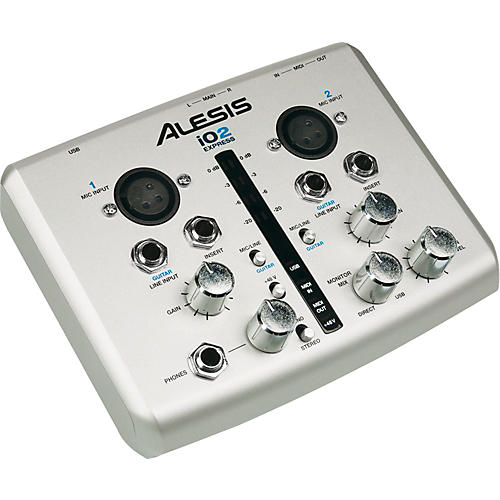
The compact Alesis iO2 EXPRESS audio-recording interface is ideal for home studios and portable recording setups. The 2-channel USB interface for Mac and PC-based systems enables you to record at up to 24-bit resolution for input into virtually all DAW, recording, and performance software.

The Alesis i02 EXPRESS recording interface is small enough to comfortably fit into your mobile recording rig, laptop bag, or backpack, yet it contains high-quality components and circuitry suitable for the studio.

Flexible recording and playback
The i02 EXPRESS interface's discrete-design preamplifiers and true 48-volt phantom power ensure that you capture microphones' complete signal. High quality analog-to-digital and digital-to-analog converters ensure that every detail of your session or performance gets recorded – and played back on your monitoring system. It's class compliant, so you can use the plug-and-play Alesis iO2 EXPRESS with virtually any computer.

The iO2 EXPRESS is USB bus powered so you won't need to carry a bulky power supply, and its performance is optimized for minimal laptop battery drain so you'll be able to track long sessions and gigs remotely.

Complete iO
The iO2 EXPRESS has 2 input channels. Each channel has an XLR microphone input, a 1/4" TRS insert for external effects units, and a 1/4" TS jack that works with line-level sources and can accommodate direct connection of guitars.

The Alesis iO2 EXPRESS sends and receives 2 audio channels on a single USB cable for simple, universal interface. You can monitor your sessions on any studio monitoring or other loudspeaker system via dual 1/4" balanced outputs. For remote tracking and alternative playback, the iO2 EXPRESS has a 1/4" TRS headphone output.

The iO2 EXPRESS features traditional MIDI In and Out jacks for playing and controlling software with keyboard and pad controllers, workstations, and other MIDI-compatible instruments.

Level management
Each channel has a gain trim control, and there's a master level control for optimal gain staging. When monitoring on headphones, you'll appreciate the dedicated volume control.

You can also visually monitor levels and operation using the tricolor, stereo metering tree and lighted status indicators.

Complete the package
The Alesis iO2 EXPRESS comes complete with a copy of Steinberg Cubase LE digital audio workstation (DAW) software. Cubase is one of the most popular DAWs in the world thanks to its intuitive approach to composing, recording, editing, and mixing.

In addition to the included software, the Alesis iO2 EXPRESS is compatible with virtually all audio and MIDI software.

Features

  • 2-channel computer audio recording interface
  • Record up to 24-bit/48kHz audio into virtually any software
  • Monitor sessions with balanced studio monitor and headphone outputs
  • High-quality A/D and D/A converters, discrete-design preamps, 48V phantom power
  • Inputs for microphones, line-level sources, and instruments including guitars
  • Tricolor stereo level meter and lighted status indicators for visual monitoring
  • MIDI Input and Output jacks for playing and controlling software instruments
  • USB bus powered – no external power supply needed
  • Includes:
  • iO2 EXPRESS interface
  • USB cable

Get a recording interface that goes where you go!

iO2 Express Audio Interface Specifications:

  • SYSTEM REQUIREMENTS
  • Mac: OS X 10.2+
  • Windows: XP, Vista, or 7
  • USB port
  • FREQUENCY RESPONSE
  • MIC/LINE IN to USB OUT: ±0.1dB
  • MIC/LINE IN to MAIN OUT (through ADC/DAC) ±0.35dB
  • SIGNAL-TO-NOISE RATIO (SNR)
  • MIC/LINE IN (balanced) to INSERT OUT: 110dB A-weighted, input impedance at XLR or 1/4" jack = 600 ohms
  • GUITAR IN (unbalanced) to INSERT OUT: 99dB A-weighted, input impedance at 1/4" jack = 600 ohms
  • MIC/LINE IN (balanced) to USB OUT: 99dB A-weighted, input impedance at MIC or LINE jack = 600 ohms
  • GUITAR IN (unbalanced) to USB OUT: 94dB A-weighted, input impedance at 1/4" jack = 600 ohms
  • MIC/LINE IN (balanced) to MAIN OUT (through ADC/DAC): 97dB A-weighted, input impedance at MIC or LINE jack = 600 ohms
  • MIC/LINE IN (balanced) to MAIN OUT (through direct monitor): 95dB A-weighted, input impedance at MIC or LINE jack = 600 ohms
  • TOTAL HARMONIC DISTORTION + NOISE (THD+N)
  • MIC/LINE IN (balanced) to INSERT OUT: <0.001% Input Gain = minimum, 1KHz input signal, INSERT OUT = 5.7dBV
  • GUITAR IN (unbalanced) to INSERT OUT: 0.034% Input Gain = minimum, 1KHz input signal, INSERT OUT = 5.3dBV
  • MIC/LINE IN (balanced) to USB OUT: 0.003% Input Gain = minimum, 1KHz input signal, USB OUT = -0.3dBFS
  • GUITAR IN (unbalanced) to USB OUT: 0.034% Input Gain = minimum, 1KHz input signal, USB OUT = -0.7dBFS
  • MIC/LINE IN (balanced) to MAIN OUT (through ADC/DAC): 0.005% Input Gain = minimum, 1KHz input signal, MAIN OUT = 5.6dBV
  • MIC/LINE IN (balanced) to MAIN OUT (through direct monitor): 0.006% Input Gain = minimum, 1KHz input signal, MAIN OUT = 5.6dBV
Customer Reviews
Loading....

Review Snapshot®

by PowerReviews
AlesisiO2 Express Audio Interface
 
4.0

(based on 18 reviews)

Ratings Distribution

  • 5 Stars


    (11)

  • 4 Stars


    (3)

  • 3 Stars


    (0)

  • 2 Stars


    (1)

  • 1 Stars


    (3)

80%

of respondents would recommend this to a friend.

Pros

  • Compact (4)
  • Good audio (4)
  • Easy to use (3)
  • Lightweight (3)

Cons

    Best Uses

    • Home studio (4)

    Most Liked Positive Review


    Alesis IO2 *Update*

    *Technical Issue Update*The issues I was having that I stated back in October of last year are now resolved. Being that the IO2 Express does not have dedicated USB drivers, it relies solely...Read complete review

    *Technical Issue Update*The issues I was having that I stated back in October of last year are now resolved. Being that the IO2 Express does not have dedicated USB drivers, it relies solely on OS drivers, now the issue was that there is a well known driver conflict that can occur if you have any Logitech Cam installed. Rendering the unit useless via USB. A simple google search regarding Logitech and USB Audio driver conflict will bring up a simple fix requiring you to edit the registry. Once done the unit will now function as promised with only a question of personal taste. I still am disappointed in Alesis' lack of mention for trouble shooting on the product page of their website, in addition to their less than reliable customer service, but the unit now functions properly. This is meant to be a notice for anyone who is experiencing these issues and are about to return it. It will save you and the company you purchased from a headache.

    VS

    Most Liked Negative Review


    Great when it works

    I had issues with the Alesis io2 from the moment I first used it. I could not get Windows XP SP3 to recognize the plug and play driver for the unit. After hours of ...Read complete review

    I had issues with the Alesis io2 from the moment I first used it. I could not get Windows XP SP3 to recognize the plug and play driver for the unit. After hours of trouble shooting the unit still would not work. I also contacted tech support and never received any call back nor email response regardless of attempts. Horrid customer support.On a tiny positive note. I did finally get the unit to be recognized after a clean OS install after failed attempts to reinstall audio drivers and chipset drivers. Was on a clean system so it wasn't a loss. I enjoyed a few months of use which the unit did exactly what it was said however as of today the unit is no longer recognized yet again. 4 hours in and still no luck. I would advise paying extra for a fully supported interface as the Alesis io2 not only lacks technical thought but customer support.

    Reviewed by 18 customers

    Sort by

    Displaying reviews 1-10

    Back to top

    Previous | Next »

     
    5.0

    Does it's job

    By Lioneye

    from Colorado Springs, Co

    About Me Experienced

    Ask me a question

    Pros

    • Clear Sound
    • Compact
    • Easy To Use
    • Lightweight
    • Quiet
    • Versatile

    Cons

      Best Uses

      • Home Studio

      Comments about Alesis iO2 Express Audio Interface:

      This device does everything it says, I can get really great stereo recordings with my AT mics. I use this for recording my acoustic guitar and my amps. If you have a problem with this device it is probably your fault. I have also used the direct guitar line in and it works great. I have had this for over a year, took care of it and it still works great.

      Comment on this review

       
      5.0

      SO FAR SO GOOD

      By Andy

      from Rapid City, SD

      About Me Novice

      Pros

      • Clear Sound
      • Compact
      • Good value
      • Sounds good

      Cons

        Best Uses

        • Amateur Recording
        • Home Studio

        Comments about Alesis iO2 Express Audio Interface:

        I had a little trouble getting sound at first but I am a complete novice at home recording. I'm using in conjunction with Magix Music Maker and Magix Studio. It took me awhile but once I stumbled on the correct settings everything is working great. Sounds good easy to use. If you are looking for doing basic home recording of guitar, bass, vocals etc this seems to be a real good deal for not alot of money

        Comment on this review

         
        4.0

        Hey, it works. You know...

        By HumanBeing

        from Richmond, Virginia

        About Me Experienced

        Pros

        • Clear Sound
        • Compact
        • Easy To Use
        • Lightweight
        • Works

        Cons

        • Cheap Quality
        • Get What You Pay For

        Best Uses

        • Amateur Recording
        • Home Studio

        Comments about Alesis iO2 Express Audio Interface:

        The Alesis iO2 is cheap, the cheapest interface you can really get. And it does work. However, this thing is made of plastic, except for the notches which are metal, so it's not super durable. Also, again with the cheapness, it has tendency, when surrounded by other electrical equipment and you touch it, to short circuit. All you do is unplug it then plug it back into the computer to turn it back on after this happens, but it is still unsettling. It records two channels at once which is dynamite if your using Audacity. However, when working with Audacity make sure you change the recording Hz to 48000. Which is another thing, like all Computer related stuff, there is going to be problems. I have not really had any. But considering how everyone's computers are different and everyone is using different recording software it is difficult to say who this will and wont work for. (It will work for an HP ENVY 15 on windows 7 using Audacity.) And the recording software included with the device is uh.....it might work. It has no manual and pretty incomprehensible on its own.

        Comment on this review

         
        4.0

        IO2 Express Works for Me

        By Vince Tampio

        from Philadelphia, PA

        About Me Professional Musician

        Ask me a question

        Pros

        • Clear Sound
        • Compact
        • Easy To Use
        • Lightweight

        Cons

          Best Uses

          • Home Studio
          • Professional Recording

          Comments about Alesis iO2 Express Audio Interface:

          This interface works for me. I use it to overdub DI instruments in my home studio. I use it in tandem with Audacity and Pro Tools (now that you don't need a proprietary AVID audio interface). I especially like the headphone mix feature which allows the performer to balance the raw signal and the playback.

          Comment on this review

          (2 of 3 customers found this review helpful)

           
          1.0

          Horrible

          By Disappointed

          from Washington, DC

          Verified Buyer

          Pros

            Cons

            • Breaks Easily
            • Unreliable

            Best Uses

              Comments about Alesis iO2 Express Audio Interface:

              The product never worked. I could not get output to my external speakers. I could not get input response when I connected the mic to the io2. I contacted Alesis and followed their exact instructions and it still didn't work. I tried returning it but Musician's Friend doesn't accept returns on audio interfaces that have software included so I am stuck with a product that doesn't work! It has just been a bad experience all around!!!

              Comment on this review

              (6 of 6 customers found this review helpful)

               
              5.0

              Highly recommended

              By Chloe Fields

              from Portland

              Comments about Alesis iO2 Express Audio Interface:

              It's simple, cheap, and gets the job done. I bought this for a live gig and wound up using it as my primary recording device. If you can live with only 2 channles of input, this little device has all you need. Plug and play works beautifully in Windows 7. I've gotten the latency down to 8ms with the ASIO driver.

              Comment on this review

              (4 of 4 customers found this review helpful)

               
              5.0

              Wow.

              By choffman1995

              from New Jersey

              Comments about Alesis iO2 Express Audio Interface:

              This is a pretty sweet interface for the price. I was torn between this and the Lexicon Alpha but I got this for the phantom power. Glad I did. It has zero latency and is packed with features for a unit this price. AND you can record in true stereo. I dig that. Only thing is that some parts feel a little cheap. Oh well; it doesn't leave my desktop, anyway. Overall, you should get it; you won't be disappointed at all, except in the crap software it comes with. Logic is where it's at.

              Comment on this review

              (2 of 2 customers found this review helpful)

               
              5.0

              Plug and play

              By Anonymous

              from Undisclosed

              Comments about Alesis iO2 Express Audio Interface:

              I have bought it a month ago. It was very easy to setup. After plugging in I recomend to install the asio4all driver also to reduce the latency and the setup is done. Absolutely no other drivers, setting ups, instalation needed. The preamps are really good, and the direct/usb monitor mixing knob is very usefull. As I'm a keyboard player I like the midi interface too. I needed a phatom power too to run my condenser microphone. So its a really all in one product, really thinked over and developed and for small home studios. It is very easy to work with, and perfect choise for home studios.

              Comment on this review

              (5 of 5 customers found this review helpful)

               
              4.0

              Alesis IO2 *Update*

              By ToneChaser

              from Orange County, CA

              Comments about Alesis iO2 Express Audio Interface:

              *Technical Issue Update*The issues I was having that I stated back in October of last year are now resolved. Being that the IO2 Express does not have dedicated USB drivers, it relies solely on OS drivers, now the issue was that there is a well known driver conflict that can occur if you have any Logitech Cam installed. Rendering the unit useless via USB. A simple google search regarding Logitech and USB Audio driver conflict will bring up a simple fix requiring you to edit the registry. Once done the unit will now function as promised with only a question of personal taste. I still am disappointed in Alesis' lack of mention for trouble shooting on the product page of their website, in addition to their less than reliable customer service, but the unit now functions properly. This is meant to be a notice for anyone who is experiencing these issues and are about to return it. It will save you and the company you purchased from a headache.

              Comment on this review

              (4 of 5 customers found this review helpful)

               
              5.0

              Great for Beginning Recording

              By Stereophobe

              from Syracuse, NY

              Comments about Alesis iO2 Express Audio Interface:

              This is the first USB interface I've owned, and I've been extraordinarily pleased with the quality of it. I get a smooth, clean sound out of both channels when recording through Cubase and Logic, and I never had any technical issues. The phantom power and extra inputs for peripherals are really nice to have for a unit this inexpensive. My one complaint is that I got some distortion in some of the sub-bass frequencies when monitoring (i.e. kickdrums would sound fuzzier than normal), but it wasn't a chronic issue and not a breaking point for someone who's just starting out recording.

              Comment on this review

              Displaying reviews 1-10

              Back to top

              Previous | Next »