Why Shop With Us?
Free Shipping
Free Standard Ground shipping (48 contiguous states, some overweight and Used/Vintage items excluded).
Orders placed before 3 p.m. ET usually ship the same business day.
Learn More2-Year Free Warranty on Guitars
Every guitar or bass you purchase from Musician's Friend (electric or acoustic, New or Open Box) includes two years of protection from manufacturer defects.
Contact Us for DetailsWe're Here for You
Our Gear Advisers are available to guide you through your entire shopping experience. Call or Chat for expert advice and to hear the latest deals.
Contact UsContact Us
Hablamos Español
866.226.2919
Hours:
MON - FRI 6 AM – 7 PM PT
SAT 7 AM – 6 PM PT
SUN 8 AM – 5 PM PT


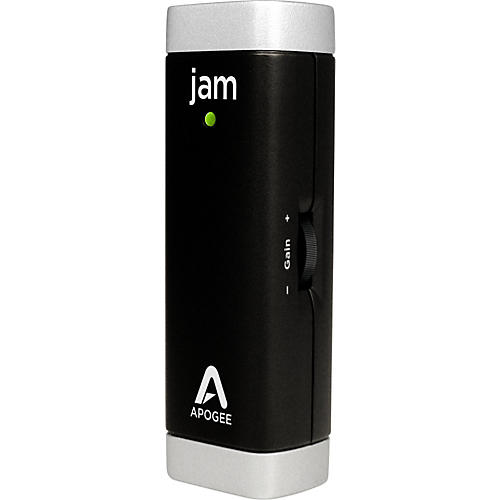
JAM Guitar Interface for iPad, iPhone, and Mac
false falseWe're sorry-this item is unavailable.
Contact our experts for a recommendation of great alternatives. Call us at 800-449-9128.
Plug and play guitar interface with Apogee conversion.
Apogee JAM is a premium digital converter featuring PureDIGITAL technology which delivers your guitar's true tone to your iPad or Mac without compromise. JAM is the first high quality interface that makes a digital connection to both iOS devices and Mac. You will notice the sonic difference between JAM and other similar products immediately.
Who is JAM for?
JAM is great for beginners and advanced players who want a high quality guitar sound for practicing, recording, or just jamming on both iPad and Mac.
Ready to rock-status and level indication
It's easy to tell if JAM is connected properly by the status LED on the top panel. If it's green, you are ready to rock and the light becomes your input level indicator. If it turns red, you are rocking too hard and you need to turn your gain down with the control knob.
Crank it up and dial it in with easy level control
JAM features an input gain control knob. This rotary style wheel is conveniently located on the side of JAM for easy thumb access and allows you to dial in the level of your guitar without accessing software.
Did you know?
JAM is a true digital device featuring special circuitry designed specifically for guitar and bass. The Apogee engineers responsible for JAM's sound quality have created professional audio hardware found in recording studios around the world and heard on countless hit records.
Features
- PureDIGITAL instrument connection delivers pristine sound quality
- Designed for electric guitar and bass
- No confusing setup, you can start recording in minutes
- Works with GarageBand on iPad and iPhone or with any Core Audio compatible application on a Mac
- Control knob allows easy input level adjustment
- Multicolor LED for status indication and input level monitoring
- Studio quality instrument preamp with up to 40dB gain
- High-quality locking output connects directly to iPad and iPhone or USB port on a Mac
- 24-bit/44.1kHz analog-to-digital conversion
- Auto Soft Limit for optimal input level
- Powered by connection to iPad, iPhone, or Mac
- Made in the U.S.A.
JAM Guitar Interface for iPad, iPhone, and Mac Specifications:
System Requirements- :
- Devices: iPad, iPad2, iPhone 4
- iOS version: 4.3 and later
- Connection: Dock connector port (no batteries required)
- :
- Computer: Mac, with an Intel processor
- Memory: 1 GB minimum of installed RAM, 2 GB recommended
- Mac OS version: 10.6.4 or later
- Connection: USB 2.0 Full Speed
- Software: GarageBand, Logic Pro, MainStage, or any Core Audio compatible application
- Free Standard Ground shipping (48 contiguous states, some overweight and Used/Vintage items excluded).
- Orders placed before 3 p.m. ET usually ship the same business day.
Every guitar or bass you purchase from Musician's Friend (electric or acoustic, New or Open Box) includes two years of protection from manufacturer defects.
Our Gear Advisers are available to guide you through your entire shopping experience. Call or Chat for expert advice and to hear the latest deals.

Musician's Friend Support