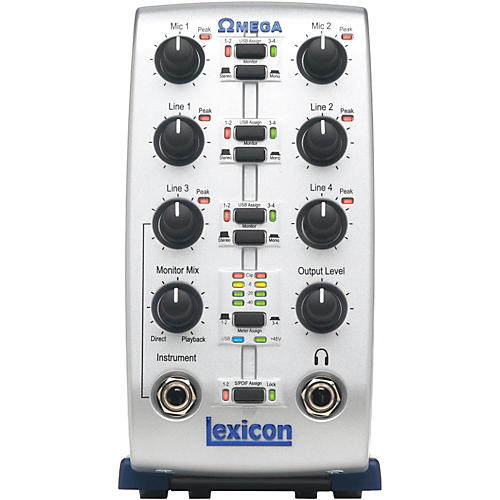
Lexicon Omega Desktop Recording Studio
- Write a Review
- SKU
- #245505000000000
-
- MSRP:
- $419.95
-
- Your Savings:
- - $270.00
-
Free Shipping on Orders over $25
-
- Your Price:
- $14995
- Free Shipping
- Top Seller
- Price Match
- Satisfaction Guarantee
-
res13052308557285128886478
- res13052308557285128886478
-
res13052308557285128886478TC Electronic Desktop Konnekt 6 Firewire Audio Interface $99.50 - $199.00
res13052308557285128886478
- res13052308557285128886478
-
res13052308557285128886478
- res13052308557285128886478
-
res13052308557285128886478
- res13052308557285128886478
Review Snapshot®
by PowerReviewsMost Liked Positive Review
In Lexicons defense...
I bought this item used off of the big auction site. Got the Omega and power supply...that was it. I downloaded the manual and the most current driver from Lexicons website, and...Read complete review
I bought this item used off of the big auction site. Got the Omega and power supply...that was it. I downloaded the manual and the most current driver from Lexicons website, and I didn't need Cubase as I am using another program (Reaper) for tracking. I guess the only thing I don't have available to use is the Pantheon reverb as it is integral to Cubase. Oh well, I have used Cubase before and I don't find it intuitive or user friendly, so I don't miss it. I have the Omega set up on a 6 year old desktop computer that I upgraded to 2GB of RAM. It works flawlessly. I have only 3 tracks per project so far, but have experienced no latency issues and honestly, I don't expect to. I do have experience with LOTS of digital recording methods and devices and like other users have mentioned already, the poor reviews from people who can't seem to get the product set up or functioning properly probably have very little knowledge, experience or patience to get the job done. I have found the Omega to be a fantastic UI and I would highly recommend it. Misses: no on/off switch, and controls on the front and inputs on the back, so you constantly have to pick it up and "spin it around" to change whatever your plugging into it. Otherwise, good stuff.
No on/off switch.
No problems, sounds fantastic.
Can't be beat in this category, and I shopped around.
VS
Most Liked Negative Review
Not recommended for Windows 7
The Omega is an attractive unit compared to others at the same price range. I could have got a Focusrite or PreSonus at the same price but with much less features. This offered more ...Read complete review
The Omega is an attractive unit compared to others at the same price range. I could have got a Focusrite or PreSonus at the same price but with much less features. This offered more channels, digital I/O, the very wonderful Pantheon reverb and nice monitoring features. *HOWEVER* the Lexicom is SUCH A PAIN with Windows 7. The drivers, although updated in 2011 and are supposed to support Win 7 64-bit, almost never function correctly with any piece of audio software. I use several including Cubase, Reason and a few others, but even with just Cubase (which comes bundled with the unit) I have to...
- uninstall the drivers- perform a factory re-set on the Omega- re-install the drivers- re-boot the pc- delete the Cubase preferences- Start and configure Cubase to use the Lexicon AISO drivers- keep my fingers crossed that all that works because even then it doesn't always.
And that's EVERY TIME I want to hook up the Omega to Cubase.
And don't think that this is just me playing around because I don't know what I'm doing....I DO know what I'm doing when it comes to sound equipment and, more importantly, the above instruction came from Lexicon support when I wrote to them about the problems I had with the drivers.
So, bottom-line...don't buy this if you plan on using it with Win 7 64-bit. Maybe other OS's fare better...
The features offered were the main reason I bought the Omega over others in the price range...8x4x2 channels digital I/O, good monitoring features and the Pantheon reverb.
Looked good on paper!!
The build quialiy seems pretty good - at least the external build quality...!
It was a good price for what it offered, however the problems with getting the thing to work make it useless, regardless of the price.
Reviews
Reviewed by 200 customers
Sort by
Displaying reviews 1-10
Previous | Next »
Pros
Cons
- Breaks Easily
- Unreliable
Best Uses
Comments about Lexicon Omega Desktop Recording Studio:
I finally realized this is a horrible pile of junk after 20 some odd calls and e-mails to tech support to figure out what was wrong with it. not user friendly, does not function properly, constantly crashes, constantly changes the driver settings etc. Throw it away, and/or don't waste your money.
Don't believe me? go look at the discussion boards on their own website for proof, a lot of un happy people
Pros
- Lightweight
Cons
- Drivers Crash My Computer
- Pricey / Poor Value
- The Software Is Temporary
Best Uses
- Stereo Recording
Comments about Lexicon Omega Desktop Recording Studio:
The software and drivers crash my NEW computer, EVERY TIME. Forcing me to do a System restore. The drivers cause my computer to not boot again. I can unplug the unit and reboot, then if i plug it in it blue screens.
The unit ONLY works as plug n play, and ONLY for MIC 1 & 2. All other lines in are worthless in this capacity.
I don't like Cubase and don't want it, there are no other options with the instructions.
Save your money buy something else!
Pros
Cons
Best Uses
- Nice Conversation Piece
- Ugly Paperweight
Comments about Lexicon Omega Desktop Recording Studio:
Do the math first. If the math is too confusing, then listen to others. This item looks great. How nice to have something you just plug into a USB port and sail off into professional multi-track recordingville. Too good to be true? Ever wonder why most USB/firewire plug and go devices get so many complaints? Maybe, just maybe, serial data ports have a problem handling multiple high bit, high sampling rate data all at once? For about the same price I opted, after much research and confusion, to just get a small mixer, an inexpensive yet professional quality SOUND BOARD that came with a Cubase DAW and went off to the races. I soon replaced the Cubase APP with Samlitude. Nothing wrong with Cubase, it worked fine without a glitch. Just prefer the Samplitude, plus it is an upgrade. To sum this all up; I paid $100 for the card and DAW (new), $50 for the 1202 board and have a four mic inputs a whole bunch of line ins and outs and do full four channel duplex recording, monitor the whole mess via headphones and/or speakers. I don't have to worry about latency delays, glitches that occur from a serial data port trying to keep up. I use a sampling rate of 44.1 khz per channel. I'm only posting this to give other musicians out there another option that I think is a better path, less headache and frustration, simpler, more versatile and an end result that is much more professional. Direct ASIO inputs and outputs will produce a much higher quality sound than a serial data port with less problems. Serial data ports are great for MIDI but not so good for sound. I hope this helps some of you.
Pros
- none
Cons
- DOA
Best Uses
- GIFT FOR AN ENEMY
Comments about Lexicon Omega Desktop Recording Studio:
Lexicon made a great reverb (sadly, now obsolete for studio use with the advent of convolution reverb), but had no business trying to make i/o's. I had a Lambda that had really strange intermittent latency issues, so I returned it. I have an Omega (and several other cards) and have yet to get the Omega to work. I should have taken it back, but I assumed that I would eventually get it going. I do not lack experience. I've installed many soundcards in my own studio, those of friends, and for hire in professional, money-making studios. Trust me, if I can't get it to work, you can't either. The price-point tells it all. So many features for [$] would be a bargain if more of them installed properly and didn't have noise problems. Don't get me wrong, many soundcards have quirks that you have to learn to get them to run (turn the computer on first - or last, wait to turn on the midi rack, etc.), but my Lexicon cards have been non-starters. I have never used one in a session, and in fact have never even seen one anywhere functioning properly. Just for kicks I got the Omega out of the gear cabinet and tried to install it on my new Asus laptop (win 7). I downloaded the new driver, blah, blah, and of course it had a humming noise and wouldn't install. Apparently some of them somewhere work, so if you're hooked by the price/features, knock yourself out, but keep the receipt and return it the same day if it doesn't install or has noise or odd latency issues. Doing this may help to get them off the market.
Comments about Lexicon Omega Desktop Recording Studio:
ALL IN ALL THIS IS A FANTASTIC INTERFACE AND THE CUBASE LE SOFTWARE IS GREAT BUT I WOULD ADVISE UPGRADING TO PROTOOLS
ALL THE INPUTS HAVE PROVIDED MORE THAN ENOUGH FOR WHAT I NEEDED
EVEN THOUGH ITS PLASTIC ITS STILL STANDING
Comments about Lexicon Omega Desktop Recording Studio:
The Omega is an attractive unit compared to others at the same price range. I could have got a Focusrite or PreSonus at the same price but with much less features. This offered more channels, digital I/O, the very wonderful Pantheon reverb and nice monitoring features. *HOWEVER* the Lexicom is SUCH A PAIN with Windows 7. The drivers, although updated in 2011 and are supposed to support Win 7 64-bit, almost never function correctly with any piece of audio software. I use several including Cubase, Reason and a few others, but even with just Cubase (which comes bundled with the unit) I have to...
- uninstall the drivers- perform a factory re-set on the Omega- re-install the drivers- re-boot the pc- delete the Cubase preferences- Start and configure Cubase to use the Lexicon AISO drivers- keep my fingers crossed that all that works because even then it doesn't always.
And that's EVERY TIME I want to hook up the Omega to Cubase.
And don't think that this is just me playing around because I don't know what I'm doing....I DO know what I'm doing when it comes to sound equipment and, more importantly, the above instruction came from Lexicon support when I wrote to them about the problems I had with the drivers.
So, bottom-line...don't buy this if you plan on using it with Win 7 64-bit. Maybe other OS's fare better...
The features offered were the main reason I bought the Omega over others in the price range...8x4x2 channels digital I/O, good monitoring features and the Pantheon reverb.
Looked good on paper!!
The build quialiy seems pretty good - at least the external build quality...!
It was a good price for what it offered, however the problems with getting the thing to work make it useless, regardless of the price.
Comments about Lexicon Omega Desktop Recording Studio:
This unit will not set up in any way on newer Macs, other than as 2x2 DEMO. This will get you a cute little BEEP in your ear every 30 seconds, if your lucky.
3 emails to Lexicon Tech Support (including checking "copy me" on email) yeilded no response; nuthin', zip, nada; not even the blind copy, or an auto response. OK, so I email the Harmon Group, Lexicon's mother ship. Similarly, nothing.Can't
Can't judge features, 'cause I've never been able to get the thing to do what it's supposed to. Scoured the web, Lexicon's site, and pleeded with the company for assistance. Absolutely nothing.
If you plan to use this with a Mac - ever - STOP, back away, and don't look back.
Pops, clipping, USB chatter. Grrrrreat!
Cheaply made. Has 4 pieces of slag metal screwed to the bottom (both inside and outside) just to feel substantial. Inside, a mess of glue, bent components, and badly routed cables.
NRBQ put it this way: "Ain't No Free". Save your pennies,wait a while, and buy something that isn't junk; from a company that is in the business of working with musician's; not simply wringing the lat few dollars from formerly awesome company's name. Lexicon had awesome products, back in the 80's; but just like HP, greed and short-sightedness have tarnished their hard-earned reputation.
Comments about Lexicon Omega Desktop Recording Studio:
I bought this item used off of the big auction site. Got the Omega and power supply...that was it. I downloaded the manual and the most current driver from Lexicons website, and I didn't need Cubase as I am using another program (Reaper) for tracking. I guess the only thing I don't have available to use is the Pantheon reverb as it is integral to Cubase. Oh well, I have used Cubase before and I don't find it intuitive or user friendly, so I don't miss it. I have the Omega set up on a 6 year old desktop computer that I upgraded to 2GB of RAM. It works flawlessly. I have only 3 tracks per project so far, but have experienced no latency issues and honestly, I don't expect to. I do have experience with LOTS of digital recording methods and devices and like other users have mentioned already, the poor reviews from people who can't seem to get the product set up or functioning properly probably have very little knowledge, experience or patience to get the job done. I have found the Omega to be a fantastic UI and I would highly recommend it. Misses: no on/off switch, and controls on the front and inputs on the back, so you constantly have to pick it up and "spin it around" to change whatever your plugging into it. Otherwise, good stuff.
No on/off switch.
No problems, sounds fantastic.
Can't be beat in this category, and I shopped around.
Comments about Lexicon Omega Desktop Recording Studio:
I have had this little guy for about seven years now and I'm still using it. I will admit that it takes a little time to figure it out, but that is to be expected. Be sure and check the website for the most recent drivers and updates. I think this is why some people are having issues with these. You don't have to be a computer geek, but you might need one to install and set it up for you the first time.
Comments about Lexicon Omega Desktop Recording Studio:
After 2 years of debating, I got my Omega. Laid drum tracks, sounded okay. So then I did bass track. EXTREME latency. Can only adjust buffer size from Cubase! I didnt plan on installing Cubase at all, so im screwed. My 7 year old Tascam US122 was plug and play no latency issues at all. Sent Omega back and got E-mu tracker Pre. LOVE it!