Why Shop With Us?
Free Shipping
Free Standard Ground shipping (48 contiguous states, some overweight and Used/Vintage items excluded).
Orders placed before 3 p.m. ET usually ship the same business day.
Learn More2-Year Free Warranty on Guitars
Every guitar or bass you purchase from Musician's Friend (electric or acoustic, New or Open Box) includes two years of protection from manufacturer defects.
Contact Us for DetailsWe're Here for You
Our Gear Advisers are available to guide you through your entire shopping experience. Call or Chat for expert advice and to hear the latest deals.
Contact UsContact Us
Hablamos Español
866.226.2919
Hours:
MON - FRI 6 AM – 7 PM PT
SAT 7 AM – 6 PM PT
SUN 8 AM – 5 PM PT


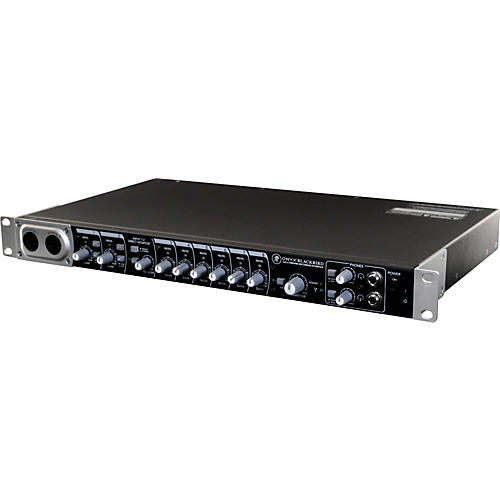
Onyx Blackbird Premium 16x16 FireWire Recording Interface
false falseWe're sorry-this item is unavailable.
Contact our experts for a recommendation of great alternatives. Call us at 800-449-9128.
With boutique-quality preamps, AD/DA conversion and a host of flexible, professional features.
Studios, regardless of size, can't usually afford to buy all the gear they want at once. That's why investing in gear designed with performance, flexibility and expandability in mind is critical. The additional mic inputs, onboard 8x8 ADAT and word clock I/O provide easy integration into any digital or analog setup. For more complex sessions, the powerful Blackbird Control DSP Matrix Mixer allows for quick mix creation and routing of any input to any output. Plus, since Blackbird works as a standalone 8-channel preamp rack, you've got a single-box solution ready for integration into your studio or mobile setup.
Boutique-quality Onyx preamps
Great recordings start with high-quality preamps and you will simply not find preamps at this price range better than Blackjack's Onyx preamps. Mackie invested significant R&D efforts into developing their flagship Onyx mic preamps. Found on Mackie's most expensive studio consoles, Onyx pres are designed to meet or surpass expensive, esoteric standalone mic pres in terms of fidelity, headroom and transparency - as well as improved radio frequency (RFI) rejection and ultra-wide dynamic range. And with a full 60dB of available gain, would-be competitors are left in the dust.
High-quality AD/DA conversion
Quality doesn't stop at the boutique Onyx preamps. The Onyx Blackjack uses Cirrus Logic converters offering 114dB dynamic range (A-weighted) - a specification other companies sometimes charge thousands of dollars to achieve. Mackie's preamp circuitry is aligned precisely with the onboard analog-to-digital conversion to always provide you with the most headroom and the lowest noise and distortion possible, a real sonic benefit that is often ignored on smaller interfaces.
Professional Digital I/O
Studio growing? Blackbird can work into your studio in a number of ways. It's the perfect front end to your DAW using the FireWire connection. Plus, if you get more preamps later (like another Onyx Blackbird), you can simply connect them via Blackbird's integrated 8x8 ADAT I/O, delivering a full 16-channel 24-bit/96kHz resolution recording solution. There's also onboard word clock I/O perfect for any scenario incorporating multiple pieces of analog/digital gear. That means Blackbird is also an ideal standalone 8-input preamp unit for integration into a larger studio or digital live setup.
Two full-blown super channels
Even though there's tons of available I/O on Blackbird, the two front-panel "Super Channels" offer extremely useful features, right within your reach. First off, both channels utilize combo inputs, allowing you to easily swap between mic, guitar, keys, drum machines or whatever comes up during the session. Dedicated 48V phantom power is perfect for any studio-quality condenser microphone. And because these inputs feature true analog hardware monitoring, in either mono or stereo, you can route the signals directly to your studio monitors or headphone, bypassing the need for a matrix mixer, so you and your artists can get right to work. Zero-latency overdubs have never been easier to setup or control.
Powerful Blackbird Control DSP Matrix mixer
The Onyx Blackbird is powerful all on its own. However, for more complex applications, Mackie provides you with the custom-designed 18x16 Blackbird Control DSP Matrix Mixer application. This powerful graphic user interface (GUI) allows for customization and ease-of-use that the competition is simply unable to achieve.
¢Route any input to any output at any volume and pan orientation
¢Apply custom names to all channels and output mixes for quick, at-a-glance reference and control
¢18x16 design, offering a stereo playback stream routable to all monitoring paths
¢All DSP mixer I/O is fully customizable in this powerful, one-click solution
This intuitive software looks and operates just like an actual mixer, with the ability to pan, solo, mute and control various output levels. Each stereo output is controlled by a dedicated 18x2 mixer, with each output mixer accessible at the touch of a button. Blackbird Control also indicates input levels and peaks, allows for mono/stereo linking of adjacent channels and more. It not only simplifies the engineer's job, it is powerful, sleek and fun to use.
Tough but friendly
In true Mackie tradition, Onyx Blackbird features a "Built-Like-A-Tank" design, with a powder-coated, all-steel chassis that can get bumped around with the best of them. It's ultra-compatible, working with any DAW that supports WDM/ASIO (PC) or Core Audio (Mac). This includes popular applications like Logic, SONAR, Cubase, Ableton Live, and Final Cut Pro. It also comes with Mackie's Tracktion 3 Music Production Software to get rolling right out of the box.
So, if you are looking for a new mothership for your studio, or want to expand upon the setup you already have, consider the Onyx Blackbird. Tons of boutique-quality pres, unmatched AD/DA conversion and a host of flexible, professional features it's the perfect solution for any studio.
Features
- Eight boutique-quality Onyx mic preamps with class-leading fidelity and dynamic range
- High-headroom design with ultra-low noise and distortion
- Professional 16x16 24-bit recording/playback
- Flexible FireWire routing
- 8x8 ADAT I/O for ultimate expandability
- Onboard wordclock I/O for studio and live integration
- Acclaimed JetPLL jitter elimination technology
- High-end Cirrus Logic AD/DA converters with 114dB dynamic range (A-weighted)
- Compatible with most major DAWs: Logic, Sonar, Cubase, Ableton, Live, Final Cut Pro and more
- Powerful and flexible "Super Channels"
- Front panel connectivity for easy access
- True analog hardware monitoring of inputs, in mono or stereo, for easy zero latency recording
- 80Hz low-cut switches
- Dedicated 48V phantom power
- Built-in DI for direct connection of guitars, bass, etc.
- Inserts for outboard processing gear
- Ideal eight input standalone preamp unit with up to 96khz ADAT (S/MUX II) outputs
- 48V phantom power on all inputs for use with condenser microphones
- Studio monitor, main and alternative outputs with independent level control and source selection
- Two headphone outputs with independent level control and source selection
- Includes powerful Blackbird Control DSP Matrix Mixer
- Route any input to any output
- Zero-latency tracking of all inputs
- Quickly set up independent mixes for headphones and more
- Easily aggregate up to four units on Mac or PC
- Sleek, ergonomic "Built-Like-A-Tank" desktop design
- Includes Tracktion 3 Music Production Software for Mac or PC
Get an interface designed with performance, flexibility and expandability in mind.
Onyx Blackbird Premium 16x16 FireWire Recording Interface Specifications:
Software requirements:- For PC
- Microsoft Windows 7 32 / 64, Vista 32 / 64 RTM or XP SP 2
- Pentium 4, Celeron or Athlon XP processor
- 512 MB RAM
- For MAC
- Mac OS X 10.5.0 - 10.6.8
- G4 processor
- 512 MB RAM
- Dimensions (H x D x W): 1.8" x 10.2" x 19" (46 x 260 x 493mm)
- Weight: 8.2 lb.
- Free Standard Ground shipping (48 contiguous states, some overweight and Used/Vintage items excluded).
- Orders placed before 3 p.m. ET usually ship the same business day.
Every guitar or bass you purchase from Musician's Friend (electric or acoustic, New or Open Box) includes two years of protection from manufacturer defects.
Our Gear Advisers are available to guide you through your entire shopping experience. Call or Chat for expert advice and to hear the latest deals.

Musician's Friend Support