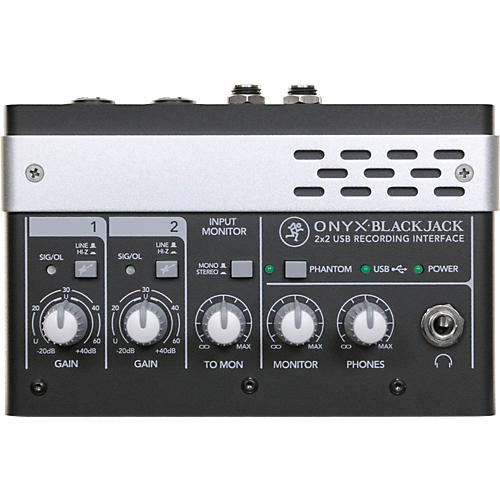
Mackie Onyx Blackjack Premium 2x2 USB Recording Interface
- Write a Review
- SKU
- #H14105000000000
-
- MSRP:
- $199.99
-
- Your Savings:
- - $50.00
-
Free Shipping on Orders over $25
-
- Your Price:
- $14999
- Free Shipping
- Top Seller
- Price Match
- Satisfaction Guarantee
- Ships Internationally
-
res13061905345698077392623
- res13061905345698077392623
-
res13061905345698077392623TC Electronic Desktop Konnekt 6 Firewire Audio Interface $99.50 - $199.00
res13061905345698077392623
- res13061905345698077392623
-
res13061905345698077392623
- res13061905345698077392623
-
res13061905345698077392623Live Wire Advantage Standard EXM Series Microphone Cable 15... $14.99 - $99.99
res13061905345698077392623
- res13061905345698077392623
-
res13061905345698077392623
- res13061905345698077392623
-
res13061905345698077392623Mackie Thump Series TH-12A 12" 2-Way Powered Loudspeaker $150.00 - $299.99
res13061905345698077392623
- res13061905345698077392623
-
res13061905345698077392623Mackie S518S 18" Passive Subwoofer Level 2 Black 88683074925... $424.99 - $499.99
res13061905345698077392623
- res13061905345698077392623
Review Snapshot®
by PowerReviewsMost Liked Positive Review
Yup, Asio4All FTW. Great interface, stupid drivers.
Drivers are this unit's downfall. The 1.9 driver needed to be reset if the ASIO buffer filled even briefly, as it would continue to create glitches in the audio afterward. The 2.0 driver worked...Read complete review
Drivers are this unit's downfall. The 1.9 driver needed to be reset if the ASIO buffer filled even briefly, as it would continue to create glitches in the audio afterward. The 2.0 driver worked well on my laptop but produced no sound at all on my desktop when using ASIO (directsound worked fine). The only thing that has worked consistently well has been Asio4All. This is fine, as I've generally found Asio4All to be slightly more efficient than most manufacturers' own ASIO drivers, but it's rediculous that Mackie's own drivers fail so completely in this regard. Support will give you the runaround about using the DPC Latency checker, trying different USB ports, looking for IRQ conflicts, etc., but I've never had to go through this much trouble to get an audio driver to work properly. An updated driver is supposed to be coming by March, but who knows. Another issue is that the download link for the driver on their website is (at the time of writing) unavailable, which means you have to call tech support to have them email you the driver, as there is no driver CD included in the box.
Infuriating as all this is, I'm still keeping the Blackjack, because I'm convinced after using it that it's the best 2x2 USB interface for the price, and maybe even regardless of cost. A firewire interface is still a better option, but most are much more expensive and likely aren't a significant improvement in fidelity.
There are few interfaces in this price range with decently-speced preamps, and I was down to the choice between this and the Scarlett 2i2, so I bought both to try out. I found the Mackie bests the Focusrite in almost every respect (except for drivers... more on that later). The preamps on the Blackjack were clearly better. I couldn't say how good they are in their own right as I don't have a lot of experience with pres, but I know my V67g sounded dull and lifeless on the Scarlett, whereas vocals sounded much more natural and detailed through the Mackie. The headphone output is stronger as well, able to drive a pair of DT880s without issue. There were other things I appreciate about the Mackie that I wouldn't have otherwise considered without comparing it to the Focusrite, like having markings around the knobs that made it easier to remember where I set the gain for a particular instrument / microphone, and being able to adjust the monitor level in the headphones (the 2i2 only allows you to adjust the monitor level for speakers via that big silver knob).
While it's not the prettiest-looking interface, it's impressively heavy for it's size. There's no give to the jacks or any other part of the interface, and no paint to wear off of the knobs. By far, it's the best build quality I've seen in an interface.
It's hard to think of another interface that offers this level of sound quality at this price. The only other USB interface I would have considered (aside from the Scarlett) is the Steinberg CI1, which is cheaper and has the same 60db of gain on the preamps but lower-quality ADC/DACs and a cheaper build. If I could use a firewire interface I'd jump at the TC Electronic Desktop Konnect 6, though it is slightly more expensive.
VS
Most Liked Negative Review
Mackie is NOT What They Used To Be!
I have been struggling with this unit for almost a year now. I have over 30 years of pro audio experience. My computer was brand new when I purchased this unit and is very ...Read complete review
I have been struggling with this unit for almost a year now. I have over 30 years of pro audio experience. My computer was brand new when I purchased this unit and is very stout as well as being optimized for audio production. Mackie techs keep telling me that they are working on the issues with this unit and that updated drivers will be available in the next month but I hear this from them all the time. I can't even use the Mackie ASIO drivers because they create noise, do not function properly or fail outright. 355ms of latency is absolutely unacceptable in this day and age for a product of this caliber. "Signal chain" is very important in getting your mix perfected in the pro audio industry and a decent mix cannot be achieved with this product. Constantly having to readjust the settings and driver for audio anomalies and latency issues is extremely unproductive. Since they have strung me along for months I'm sure that they will no longer honor their warranty at this point. I will probably end up trashing the unit, buying another manufacturer's product and never purchasing another Mackie product ever again. In my eyes a product functioning this poorly over such a long period of time is "misrepresentation" pure and simple.
The Onyx preamps are appealing but the overall quality is appauling.
Appears to be very good construction but if it doesn't work, what does it matter?
I am never buying Mackie again!
Reviews
Reviewed by 16 customers
Sort by
Displaying reviews 1-10
Previous | Next »
Comments about Mackie Onyx Blackjack Premium 2x2 USB Recording Interface:
This doesn't work, period. I have a brand new computer running Windows 7 and this won't work at all. The driver download from Mackie fails 30 seconds into every recording I attempt. I've tried Cakewalk, Tracktion, Nuendo, and Pro Tools. I've been trying different I/O options for 4 hours. Nothing works. If you want static, distortion, and over 300ms of latency, this is the unit for you.
Pros
- Clear Sound
- Compact
- Durable
- Easy To Use
Cons
- Unreliable
Best Uses
- Home Studio
Comments about Mackie Onyx Blackjack Premium 2x2 USB Recording Interface:
Purchased this to use with Reaper DAW only to find that the Windows 8 default USB drivers incur a nearly 1 second latency when attempting to use VSTi amp simulations.
So, I go to the Mackie website recommended in their literature documentation that came with the device:
www.onynupdate.com - and get a TIME OUT error returned from the web address.
So, I go to Mackie.com --> locate Onyx Blackjack --> go the it's support page ---> download and install the zip file ---> run the Setup application and it reports back "Can't load drivers. This operating system is not supported".
Contacted Mackie support via email – they advised to "Watch this page closely for when they may support Windows 8 in the future" CAN YOU BELIEVE IT?!!!!
Behind the curve for Windows 8 support? Ah, YEAH... BIG TIME.
Now... to the credit of Musicians Friend, in the Specifications, they do not list support of Windows 8 32/64bit - the Windows 8 DEFAULT USB drivers work but, as stated before, there is a major latency issue when using a VSTi which renders the whole unit worthless.
I have a lot of Mackie hardware but... the Customer Support has changed. They don't support me? Well... then I don't support them any more.
This unit gets returned.
Pros
- Brand name
- Compact
- Durable
Cons
- Drivers Lack Thereof
- Inputdaw Balance Knob
- Limited compatibility
- Limited Functions
- Poor Sound Quality
- Pricey / Poor Value
- Random Power Failure
- Unreliable
Best Uses
- None
Comments about Mackie Onyx Blackjack Premium 2x2 USB Recording Interface:
I am a recording engineer/producer with my own studio. I bought this to supplement my rig and replace a cheap Lexicon Alpha (great interface btw). This is so much worse than the Alpha. The only thing good is the durability. The monitor knob is set to "blend" instead of "pan", meaning that you can never solo the input monitor over the DAW output, only mix it in, which is useless because you can never hear yourself in the headphones when you try to monitor. To turn up your input level in the headphones turns up the DAW output too. Also, the drivers must be downloaded (no disc included) and they don't work on Windows 7 (32 bit OR 64 bit), nor on any decent software for that matter. It also randomly shuts off on a number of different nice PCs. DO NOT BUY THIS SUPPOSED MACKIE PRODUCT. A lot of companies are putting out USB sound cards even though its not their forte, and they fail miserably. Mackie, leave this market niche to someone who cares.
Pros
Cons
Best Uses
- Home Studio
Comments about Mackie Onyx Blackjack Premium 2x2 USB Recording Interface:
Highly recommended. Great product.
Comments about Mackie Onyx Blackjack Premium 2x2 USB Recording Interface:
I'm disappointed. The Lexicon Alpha I was using was perfect, but it was just too old.
Everything is there and in good taste for the price point-- two inputs, 48v combination jacks, etc.. but the direct monitor is a real shame. It's set up as a "blend" knob instead of a "pan", which basically means you would always be turning up the main mix along with the input. I can never achieve a comfortable direct monitor, as the backing tracks get turned up no matter what, and I like some headroom on my mic channel.
"Built like a tank"... indeed. But the drivers don't work! Sound quality is so-so but latency isn't great, that is if I'm lucky enough with a stable third party driver.
Honestly I expected more out of Mackie, and until now the brand's aesthetic alone has stood for something worth the money. This is not the best card I've owned, but it is the most expensive.
Comments about Mackie Onyx Blackjack Premium 2x2 USB Recording Interface:
I have been struggling with this unit for almost a year now. I have over 30 years of pro audio experience. My computer was brand new when I purchased this unit and is very stout as well as being optimized for audio production. Mackie techs keep telling me that they are working on the issues with this unit and that updated drivers will be available in the next month but I hear this from them all the time. I can't even use the Mackie ASIO drivers because they create noise, do not function properly or fail outright. 355ms of latency is absolutely unacceptable in this day and age for a product of this caliber. "Signal chain" is very important in getting your mix perfected in the pro audio industry and a decent mix cannot be achieved with this product. Constantly having to readjust the settings and driver for audio anomalies and latency issues is extremely unproductive. Since they have strung me along for months I'm sure that they will no longer honor their warranty at this point. I will probably end up trashing the unit, buying another manufacturer's product and never purchasing another Mackie product ever again. In my eyes a product functioning this poorly over such a long period of time is "misrepresentation" pure and simple.
The Onyx preamps are appealing but the overall quality is appauling.
Appears to be very good construction but if it doesn't work, what does it matter?
I am never buying Mackie again!
Comments about Mackie Onyx Blackjack Premium 2x2 USB Recording Interface:
I changed from my old analog video edit system to a new 64 bit Windows 7 ultimate computer & system with Sony Vegas, and I needed an interface to run audio into a USB input for use in Sound Forge/Vegas. The Mackie works beautifully for this. Whether I give it the output of my Mackie 1402 mixer or feed a mic directly into it, it does the job transparently. Phantom power works for my condensor mic. This is a solid little interface for the price. I would recommend this to a friend
.This is a no frills unit, and the best feature is it works transparantly.
The Blackjack is built like a tank (a small tank). I don't thisk you can hurt this interface.
For the money it is just fine. It does what it is supposed to do with no hassles or problems.
Comments about Mackie Onyx Blackjack Premium 2x2 USB Recording Interface:
Drivers are this unit's downfall. The 1.9 driver needed to be reset if the ASIO buffer filled even briefly, as it would continue to create glitches in the audio afterward. The 2.0 driver worked well on my laptop but produced no sound at all on my desktop when using ASIO (directsound worked fine). The only thing that has worked consistently well has been Asio4All. This is fine, as I've generally found Asio4All to be slightly more efficient than most manufacturers' own ASIO drivers, but it's rediculous that Mackie's own drivers fail so completely in this regard. Support will give you the runaround about using the DPC Latency checker, trying different USB ports, looking for IRQ conflicts, etc., but I've never had to go through this much trouble to get an audio driver to work properly. An updated driver is supposed to be coming by March, but who knows. Another issue is that the download link for the driver on their website is (at the time of writing) unavailable, which means you have to call tech support to have them email you the driver, as there is no driver CD included in the box.
Infuriating as all this is, I'm still keeping the Blackjack, because I'm convinced after using it that it's the best 2x2 USB interface for the price, and maybe even regardless of cost. A firewire interface is still a better option, but most are much more expensive and likely aren't a significant improvement in fidelity.
There are few interfaces in this price range with decently-speced preamps, and I was down to the choice between this and the Scarlett 2i2, so I bought both to try out. I found the Mackie bests the Focusrite in almost every respect (except for drivers... more on that later). The preamps on the Blackjack were clearly better. I couldn't say how good they are in their own right as I don't have a lot of experience with pres, but I know my V67g sounded dull and lifeless on the Scarlett, whereas vocals sounded much more natural and detailed through the Mackie. The headphone output is stronger as well, able to drive a pair of DT880s without issue. There were other things I appreciate about the Mackie that I wouldn't have otherwise considered without comparing it to the Focusrite, like having markings around the knobs that made it easier to remember where I set the gain for a particular instrument / microphone, and being able to adjust the monitor level in the headphones (the 2i2 only allows you to adjust the monitor level for speakers via that big silver knob).
While it's not the prettiest-looking interface, it's impressively heavy for it's size. There's no give to the jacks or any other part of the interface, and no paint to wear off of the knobs. By far, it's the best build quality I've seen in an interface.
It's hard to think of another interface that offers this level of sound quality at this price. The only other USB interface I would have considered (aside from the Scarlett) is the Steinberg CI1, which is cheaper and has the same 60db of gain on the preamps but lower-quality ADC/DACs and a cheaper build. If I could use a firewire interface I'd jump at the TC Electronic Desktop Konnect 6, though it is slightly more expensive.
Comments about Mackie Onyx Blackjack Premium 2x2 USB Recording Interface:
Do not install the Onyx drivers at all!!!!!!!!!! It will still clash with windows. Each time attach the onyx to your computer and it asks if you want to install, select no.
The ASIO4ALL Drivers works very good with the Onyx BlackJack if you do not have the Onyx drivers installed. I used it through Sonar 8 and was able to record many more tacks that my Tascam 1608
If you install or accidentally install Onyx drivers, you will have problems even if using ASIO4ALL driver.
Onyx drivers do did not work at all with Windows 7 BUT! Worked perfectly with free ASIO4ALL Driver. I will give more detail, keep reading.
Able to record several tracks. Better than my Tascam 1608
Preamps are awesome
Converters are not the greatest, so kind of defeats the preamp quality
overall a great unit for the price. Using ASIO4all drivers, able to record several multiple tracks outperforming more expensive items costing $400 to $500 like Tascam 1608. Sound quality a little better the the Tascam 1608 and a good bang for the buck.
For the price, can't beat it.
Comments about Mackie Onyx Blackjack Premium 2x2 USB Recording Interface:
Amazing piece of hardware ruined by poor Windows support. They even released win drivers a few days ago, and there are still pops/crackles and a delay in recording. Windows 7 64, and even XP users can not use this for recording. AVOID.