Why Shop With Us?
Free Shipping
Free Standard Ground shipping (48 contiguous states, some overweight and Used/Vintage items excluded).
Orders placed before 3 p.m. ET usually ship the same business day.
Learn More2-Year Free Warranty on Guitars
Every guitar or bass you purchase from Musician's Friend (electric or acoustic, New or Open Box) includes two years of protection from manufacturer defects.
Contact Us for DetailsWe're Here for You
Our Gear Advisers are available to guide you through your entire shopping experience. Call or Chat for expert advice and to hear the latest deals.
Contact UsContact Us
Hablamos Español
866.226.2919
Hours:
MON - FRI 5 AM - 8 PM PT
SAT 6 AM - 6 PM PT
SUN 6 AM - 5 PM PT


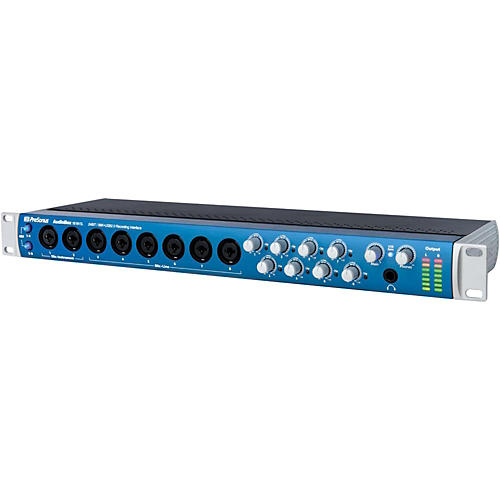
Audiobox 1818VSL 18-Channel USB Interface
false falseWe're sorry-this item is unavailable.
Contact our experts for a recommendation of great alternatives. Call us at 800-449-9128.
An 18-channel audio interface with the power of a PreSonus StudioLive digital mixer.
This is a pro product all the way, with high-end 24-bit, 96 kHz converters; Class A XMAX preamps; ADAT optical I/O; S/PDIF coaxial I/O; word-clock output; and MIDI I/O, housed in a heavy-duty, rack-mount metal chassis.
Furthermore, thanks to the power of VSL, the AudioBox 1818VSL includes a 26x8 software mixer. As a result, with just an AudioBox 1818VSL and your laptop or other computer, you can mix a studio session or live show featuring a full band-all while monitoring and recording with or without real-time processing! And you can do it simply and easily, with no hardware mixer, no outboard effects rack, and minimal wiring, thanks to the tight integration between PreSonus hardware and software.
What's so great about effects and processing on monitors?
Tracking without hearing effects and signal processing is like playing a video game with your eyes closed. Musicians rely on aural cues when performing, and their performance can vary depending on what they hear in their monitors. Adding just the right amount of compression, EQ, and reverb can make a huge difference in their ability to hear themselves clearly and to experience their performance as if it occurred in a natural space rather than in the artificial sonic environment of the studio. The result is a better performance and ultimately a better recording.
You have plenty of effects plug-ins for your DAW, but processing audio with a DAW takes more time than you might think. True, we're talking milliseconds, but it's long enough that if you put DAW effects in your studio monitors, you'll hear the original sound slightly before the processed signal, which is very disorienting. That much delay might be acceptable for live gigs, where the band is playing together in an ambient space that has natural delay. But you can't record that way in the studio.
Fortunately, PreSonus' engineering wizards have dramatically reduced processing delay in the AudioBox VSL series. The result: dynamics processing, EQ, reverb, and effects that feel real, with no audible delay.
And if you like what you hear, you can record with AudioBox VSL-series effects, too! These are the same high-quality StudioLive 16.0.2 Fat Channel dynamics processors and EQs that professional musicians, engineers, and producers record with every day.
Great processors are a PreSonus tradition
PreSonus didn't invent the first audio interface with effects. They simply did it better and for less money. Sure, some interface manufacturers that don't normally make signal processors have added a compressor, EQ and a few effects to their interfaces. But the AudioBox VSL series provides all that, plus a separate limiter, expander, and high-pass filter-and PreSonus has been making high-quality signal processors since 1995. The AudioBox VSL-series' Virtual StudioLive (VSL)-based effects and Fat Channel processing have been extensively field-tested and proven popular by tens of thousands of StudioLive-series mixer users, including many top professionals.
Of great importance, thanks to VSL's drag-and-drop convenience, adding processing and creating and loading presets is easy. Pro-level processing and superior ease of use mean you'll get better results and have more fun!
High-end sound in a versatile, roadworthy interface
Versatile and portable, the AudioBox 1818VSL offers 2 convenient front-panel mic/instrument combo inputs and 6 front-panel mic/instrument combo inputs, true 48V phantom power (switchable in 2 banks), and 8 line-level outputs. ADAT optical I/O provides 8 more channels of input and output (at 44.1 or 48kHz; 4 channels at 88.1 or 96kHz). S/PDIF coaxial digital I/O adds 2 more channels, bringing the total to 18 audio input channels and 18 output channels.
The sound is pure PreSonus, with the same high-headroom, Class A solid-state XMAX preamps found in StudioLive mixers and high-quality, 24-bit, 96 kHz converters with 114 dB dynamic range for clear, clean audio. And it boasts PreSonus' legendary 150mW headphone output, which is loud enough to explode the oysters in a Po'-Boy sandwich. (Be careful with your level control!)
The superior sound of PreSonus preamplifiers has long been a major reason that so many audio professionals prefer PreSonus interfaces. The XMAX is the finest solid-state preamplifier we make, offering three key advantages:
* 1. High Voltage. The XMAX preamplifier runs on power rails of 30V. Most off-the-shelf, op-amp-based designs run on power rails of 10V to 18V. Higher-voltage power rails deliver more headroom, deeper lows, smoother highs, and a richer overall sound.
* 2. Discrete components - not op-amps. PreSonus only uses genuine transistors, resistors, and capacitors for ultra-low noise and transparency. Op-amps add noise, coloration, and harshness to a signal.
* 3. Class A circuitry. Class A circuits have no crossover distortion and deliver purer, clearer, and more musical results than the Class AB designs that are found in many preamps.
The net result of the XMAX preamp design is high headroom, low noise, wide dynamic range, extended frequency response, and-most important-musicality and transparency, with smooth highs; solid, deep lows; and everything in between.
Pause and ponder this for a moment: a great-sounding 18x18 interface with a computer-based mixer and full complement of dynamics processing and EQ, with reverb and delay effects on dedicated buses, plus MIDI and word clock, all in a single rackspace! And there's more.
The flexibility and power of software
VSL enables you to easily manage the processing and mixing from your Mac or Windows PC and provides editor/librarian functions, making it simple to create and use a library of presets. To get you started, PreSonus included the same library of more than 50 Fat Channel presets that comes with StudioLive mixers. These presets were created by professional musicians and engineers and let you instantly set up dynamics processing and EQ for vocals, guitar, and much more.
Seamlessly integrated with the included Studio One Artist DAW and VSL, the AudioBox 1818VSL interface works with virtually all Mac and Windows audio-recording software. And unlike most things nowadays, it's very easy on your budget.
So check out the AudioBox 1818VSL: the next-generation USB 2.0 interface that gives you extensive I/O, including eight analog inputs and outputs; ADAT optical and S/PDIF digital input and outputs; real-time, low-latency processing and effects; word-clock output; rock-solid construction; software mixing; and high-end audio-all for a price you have to see to believe!
Studio Magic Plug-in Suite Included
Both new and existing registered owners of any currently available PreSonus audio interface or mixer are receiving a free bonus: the Studio Magic Plug-in Suite for Mac and Windows. The software bundle includes seven popular plug-ins in VST, AU, and AAX formats. Currently eligible interfaces and mixers include the PreSonus AudioBox USB, AudioBox i-series, and Studio-series interfaces and StudioLive Series III, StudioLive AR USB, and StudioLive RML-series mixers. The software will be automatically added to registered users’ online MyPreSonus accounts and can be downloaded at any time—even if they bought the eligible PreSonus interface or mixer years ago. The suite includes: SPL Attacker, Maag Audio EQ2, Lexicon MPX-i Reverb, Eventide H910, Eventide 2016 Stereo Room, Brainworx bx Opto Compressor and Arturia's Analog Lab Lite.
Features
Audio Quality- Max bit depth: 24-bit
- Max sampling rate: 96kHz
- Total inputs: 18
- Mic preamps: 8
- XLR/TRS combo jacks: 8
- XLR only jacks: 0
- 1/4" only jacks: 0
- S/PDIF in: 2
- ADAT/optical in: 8
- RCA in: 0
- Total outputs: 18
- XLR out: 0
- 1/4" out: 10 (TRS balanced)
- S/PDIF out: 2
- ADAT/optical out: 8
- RCA out: 0
- Computer connection: USB 2.0
- MIDI I/O: 5-pin In/Out
- Headphone output(s): 1
- Word-clock I/O: Yes
- Platform compatibility: Mac & Windows
- Phantom power: Yes
- Direct monitoring: Yes
- Onboard DSP: No
- Metering: LED meters
- Display: No
- Latency control: Yes
- Monitor control: Yes
- Headphone control: Yes
- Width: 19" (483mm)
- Height: 1.75" (44mm)
- Depth: 5.5" (140mm)
- Weight: 4.6 lb.
- Construction: All-metal chassis & knobs
- Rack-mountable: Yes
- Included software: PreSonus Virtual StudioLive and Studio One Artist 2
The AudioBox 1818VSL interface lets you record and mix a whole band with effects. Order today!
Audiobox 1818VSL 18-Channel USB Interface Specifications:
Minimum computer-system requirements:- Windows Vista, Windows 7 (32- and 64-bit)
- Intel Pentium 4 1.6GHz processor or AMD Athlon 64 3000+ (Turion) (2.8GHz or faster recommended)
- 1GB RAM (2GB or more recommended)
- Mac OS X 10.6 (Snow Leopard) or later (32- and 64-bit)
- Intel Core 1 Solo 1.5GHz processor (Intel Core Duo or Intel Xeon processor recommended)
- 1GB RAM (2GB or more recommended)
- USB 2.0 Port
- Internet connection recommended
- DVD-ROM drive (required to install Studio One Artist)
- Connector Type: Combo, XLR, female, balanced
- Mic Preamp EIN: -133dB, 20kHz BW, max gain, Rs=40 ohm, A-wtd
- Frequency Response: 20Hz - 20kHz, ±0.25dB, unity gain
- THD+N: 0.002%, +4dBu, 1kHz, unity gain, 22kHz BW, A-wtd
- S/N Ratio: 97 dB, +4dBu, 1kHz, unity gain, 22kHz BW, A-wtd
- Gain Control Range: -15dB to +65dB
- Input Max Headroom: +16dBu, < 0.5% THD
- Input Impedance: 1.7k ohm
- Phantom Power: +48VDC, 10mA total
- Connector Type: Combo, 1/4" TS, female, unbalanced
- Frequency Response: 20Hz - 20kHz, ±0.25dB, unity gain
- THD+N: 0.002%, +4dBu, 1kHz, unity gain, 22kHz BW, A-wtd
- S/N Ratio: 98dB, +4dBu, 1kHz, unity gain, 22kHz BW, A-wtd
- Gain Control Range -20dB to +20dB
- Input Max Headroom +21dBu, < 0.5% THD
- Input Impedance 10k ohm
- Connector Type: Combo, 1/4" TS, female, unbalanced
- Frequency Response 20Hz - 20kHz, ±0.25dB, unity gain
- THD+N: 0.003%, +4dBu, 1kHz, unity gain, 22kHz BW, A-wtd
- S/N Ratio: 89dB, 0dBu, 1kHz, unity gain, 20kHz BW, unwtd
- Gain Control Range: -30dB to +50dB
- Input Max Headroom: +21 dBu, < 0.5% THD
- Input Impedance: 1M ohm
- Connector Type: 1/4" TRS, female, impedance balanced
- Frequency Response: 20Hz - 20kHz, ±0.25dB
- THD+N: 0.003%, 1kHz, 22kHz BW, A-wtd
- S/N Ratio: 109dB, 1kHz, 22kHz BW, A-wtd
- Output Level: +10dBu, <0.5% THD
- Output Impedance: 51 ohm
- Connector Type 1/4" TRS, female, stereo
- Maximum Power 120mW/ch @ 60 ohm load
- Frequency Response: 20Hz - 20kHz, ±0.5dB, max gain
- THD+N: 0.01%, 1kHz, max gain, 20kHz BW, A-wtd
- S/N Ratio: 96dB, 1kHz, max gain, 20kHz BW, A-wtd
- External Power Adapter +18VDC, 2.6A, center-positive
- Connector Type 5.5 mm OD, 2.1 mm ID, 9.5 mm length
- ADC Dynamic Range: 114dB, 48kHz, A-wtd
- DAC Dynamic Range: 114dB, 48kHz, A-wtd
- Host Interface: USB 2.0 high-speed
- Bit Depth: 24-bit
- Sample Rates: 44.1kHz, 48kHz, 88.2kHz, 96kHz
- Latency: 2.8 ms - 6 ms, analog in to out
- ADAT: Optical I/O Toslink connectors, ADAT/SMUX formats
- S/PDIF: I/O RCA female connectors
- Word Clock: Output BNC connector, 4.5 Vpp @ 75 ohm load
- MIDI I/O: 5-pin DIN connectors
- 1U rack-mountable
- Road-rugged construction with all-metal chassis and metal knobs
- Weight 4.6 lb. (2.1 kg)
- 18VDC external power supply (included)
- Free Standard Ground shipping (48 contiguous states, some overweight and Used/Vintage items excluded).
- Orders placed before 3 p.m. ET usually ship the same business day.
Every guitar or bass you purchase from Musician's Friend (electric or acoustic, New or Open Box) includes two years of protection from manufacturer defects.
Our Gear Advisers are available to guide you through your entire shopping experience. Call or Chat for expert advice and to hear the latest deals.

Musician's Friend Support