• Gift Certificate
  • Track Order
  • Help
  • Feedback [+]
  • Best Selection, Price & Service. Guaranteed.
    • Fun In The Sun Savings

      Save up to $100 instantly on new gear for the summer. Just use coupon code FUNSUN2013 during online checkout or when you call to save $20, $50 or $100 on your entire order.** These savings are good in every department, so no matter what you need, we have you covered.

      Shop Now

    • Introducing New Shure Digital & Analog Wireless Systems

      The very latest analog and digital wireless systems from Shure are here. Using all new technology, Shure has taken wireless systems to the next level. All new lines are now available.

      Shop Now

    • All Deals & Discounts

      Sometimes it can be hard to keep track of all the incredible deals and promotions we have going on, so we've put them all in one place so you can easily choose the deal that's best for you. This is your ultimate source for gear savings!

      Shop Now

  • Need Help? Ask our Experts or call 800-449-9128

    Asistencia en Español 866-226-2919

  • Shop by Department
  • Deal Center
MF MD HG Fun In The Sun 06-17-13

PreSonus FireStudio Project Recording Interface 

  • Write a Review
SKU 
#241723000000000
Have a Question? Call Our Experts: 866-462-9472 PreSonus FireStudio Project Recording Interface  
  • MSRP:
    $499.95
  • Your Savings:
    - $100.00
  • Free Shipping on Orders over $25
  • Your Price:
    $39995
1 Used From $299.96

In Stock & Ready To Ship

+ Add to Wish List
See All PreSonus Audio Interfaces
Also consider
PreSonus

High-quality circuitry, practical versatility, and a generous software package make you more productive and deliver great sound.

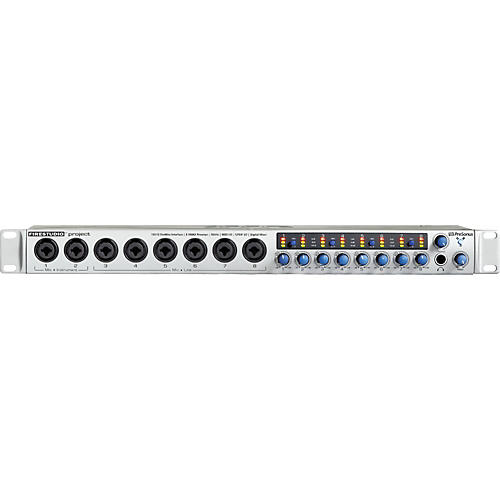
The FireStudio Project is a premium computer recording interface combining 8 Class A XMAX mic preamps, 24-bit/96kHz audio resolution, a zero-latency matrix DSP router/mixer, and Studio One Artist software. Great for professional studio recording, live recording, performance, podcasting and more, the PreSonus FireStudio Project is designed for flexibility and ultra-high sonic performance. Speaking of flexibility, the FireStudio Project interface can be daisy-chained to any other member of PreSonus' FireStudio series products (except the FP10).

Note: As of 5/26/09, you can make your FireStudio Project 64-bit compatible via a PreSonus web update.

Based on the award-winning FP10 (formerly the FirePod) the FireStudio Project starts with eight PreSonus Class A XMAX microphone preamplifiers found in the FP10 and adds the following improvements:

•Improved analog to digital converters (114dB dynamic range) for more headroom and cleaner sound
•Improved synchronization with JetPLL (jitter elimination technology) for more accurate sound
•FireControl Mixer/Router to send up to five separate zero-latency stereo mixes to musicians during recording
•Three-segment LED input metering on all analog channels for instant audio feedback
•Internal IEC-based power supply for easy portability and compatibility
•Studio One Artist music creation and production software which has the same platform and intuitive interface as Studio One Pro but with an unlimited track count, BFD Lite, Wave Arts Plug-ins, and more

XMAX Class A Preamplifiers

The FireStudio Project starts with eight custom-designed high-voltage, discrete, XMAX Class A microphone preamplifiers. PreSonus knows that your preamps are a key component in the sonic quality of your recordings. The job of a microphone preamplifier is to boost microphone level signals to line level so that the signal can be converted from analog to digital. This mic to line boost is generally a preamplification of over 400 times the voltage of the original mic level signal. This preamplification stage is one of the most important stages that the signal will go through before converted to digital, and is why a high performance preamplifier is important to achieving great results. A cheap off-the-shelf, op-amp type preamp found in most interfaces translates into thin, noisy, and harsh results. With the XMAX preamp you get full-sounding, true-to-life sonic performance to serve your music best.

DICE II and JetPLL advanced platform technology
The FireStudio Project is loaded with the ultra-powerful DICE II FireWire chipset delivering 10 channels of professional-quality 24-bit inputs and outputs simultaneously. The strength of the DICE II chip lies with its ability to easily handle high channel count at high bit-rate while minimizing latency and load on your computer.
The synchronization of the FireStudio Project is handled by patented JetPLL jitter reduction technology. JetPLL incorporates noise shaping to virtually remove all audio band jitter. JetPLL ensures the highest converter performance possible, resulting in better stereo separation and clearer more transparent audio. JetPLL delivers ultra-fast locking to any digital format, through a wide range of frequencies and is extremely robust, and tolerant of wide variations in clock frequencies. JetPLL ensures near perfect clock performance when networking audio devices thus creating the most stable and robust synchronization to the computer and all devices synchronization with the FireStudio Project.

FireControl—zero-latency DSP mixing and routing
The FireStudio Project also includes the FireControl mixer/router: an 18x10 DSP-based application for flexible mixing and direct routing of any input to any output (including the headphone output) with zero latency. The FireControl software application lives between your FireStudio Project interface and your DAW software enabling the mixing and routing of input streams coming into your FireStudio Studio Project interface and playback stream coming from your DAW software. The FireControl is capable of creating up to five stereo mixes and then routing to the outputs of your FireStudio Project for headphone mixes and various aux sends. It allows you to provide everyone in the band with a custom mix.

Also, the FireStudio Project is loaded with internal flash memory so that all FireControl settings are saved and recalled in the FireStudio Project during power off/on. This allows you to configure your FireStudio as a standalone device, without being connected to a computer for uses such as a submixer, A/D and D/A-converter, headphone mixer, format converter, instrument, or microphone preamplifier.

Studio One Artist—Plus Gigabytes of Creative Resources
The FireStudio Mobile recording system is bundled with an exceptional software package featuring PreSonus Studio One Artist DAW software for Mac OS X and Windows XP and Vista. It makes producing high-quality projects easier than ever before. As part of the Studio One Artist package, you get 20 new PreSonus Native Effects plug-ins and virtual instruments, and a generous bundle of third-party loops, software, and instrument sounds.

Features

  • High-Speed FireWire (IEEE 1394) audio interface
  • Up to 96K sampling rate
  • Improved synchronization with JetPLL (jitter elimination technology)
  • 8 XMAX Class A microphone preamplifiers (+60dB gain) w/Trim Control
  • Improved analog to digital converters (114dB dynamic range)
  • 8 analog mic/line inputs
  • 2 instrument inputs
  • 8 analog line outputs
  • S/PDIF digital input and output
  • MIDI input and output
  • Balanced Send/Return for channels 1 and 2
  • Up to 5 separate zero latency stereo mixes with FireControl Mixer/Router
  • Separate balanced main outputs and 8 balanced analog outputs
  • Free Studio One Artist software and more
  • Internal IEC-based power supply
  • Three-segment LED input metering on all analog channels

Studio One Artist

  • Elegant, single-window work environment
  • Powerful drag-and-drop functionality
  • Unlimited audio tracks, MIDI tracks, virtual instruments, buses, and FX channels
  • Content browser with convenient sort options and preview player
  • Automatic delay compensation
  • Advanced automation
  • 32-bit audio processing
  • Easy-to-use sidechain routing
  • Stunning virtual instruments
  • User-friendly sampler
  • Most intuitive MIDI-mapping system available
  • Realtime audio timestretching and resampling
  • K-System metering
  • Compatible with any ASIO-, Windows Audio-, or Core Audio-compliant audio interface
  • Works with key commands from Pro Tools, Cubase, and Logic.
  • Native Effects 32-bit effects library with 20 dynamics processors, reverbs, modulations effects, amp simulators, etc.
  • Ampire - Amplifier-Modeling
  • Auto Filter - Envelope Filter
  • Beat Delay - Tempo-Synchronized Delay
  • Binaural Pan - Stereo Panning Effect
  • Channel Strip - Dynamics Processing and Equalizer
  • Chorus - Mono/Stereo Chorus
  • Compressor - Mono/Stereo Variable Compressor
  • Flanger - Stereo/Mono Flanger
  • Limiter - Mono/Stereo Limiter
  • Mixtool - Phase and MS Utility
  • MixVerb - Mono/Stereo Reverb
  • Phase Meter phase-correlation analysis
  • Phaser mono/stereo phaser
  • Pro EQ 7-band parametric EQ
  • Red Light Distortion distortion processor
  • Room Reverb stereo/mono room reverb
  • Spectrum Meter frequency analyzer
  • Tricomp 3-band compressor
  • Tuner instrument tuner
  • X-Trem mono/stereo tremolo
  • Four virtual instruments
  • Impact Sample Trigger Drum Instrument with 32 drum kits by Ueberschall
  • Presence Sample Player Virtual Instrument with 200 sampled instruments by Digital Sound Factory
  • SampleOne Sampler Virtual Instrument
  • Mojito Analog-Modeling Subtractive Synthesizer
  • Native Instruments Kore Player with 150 instruments
  • Native Instruments Guitar Rig LE
  • Toontrack EZdrummer Lite

Put a FireStudio at the center of your projects. Order now!

FireStudio Project Recording Interface Specifications:

  • System Requirements
  • PC: Microsoft Windows XP SP1, Pentium, Celeron with 1.6Ghz or higher
  • FireWire port.
  • 512MB RAM, 1GB recommended
  • Mac: MacOS X 10.4.x or later, PowerPC G4/Dual 1 GHZ or faster, all Intel-based Mac models
  • On-board FireWire port.
  • 512 MB RAM, 1 GB recommended
  • Monitor resolution should be no lower than 1024 x 768 pixels
  • Power
  • Input Connector Type: IEC
  • Input Voltage Range: 90 to 230 VAC
  • Power Requirements: continuous 20W
  • System Requirements for Studio One Artist
  • Mac: Mac OS X 10.4.11 or Mac OS X 10.5.2 or higher, PowerPC G4 1.25 GHz or Intel Core Solo 1.5 GHz processor, 1GB RAM
  • Recommended: PowerPC G5 or better or Intel Core Duo or Intel Xeon processor or better, 2GB or more RAM
  • Win: Windows XP or Vista, Intel Pentium 4 1.6GHz processor or AMD Athlon 64 (Turion), 1GB RAM
  • Recommended: Intel Pentium 4 2.8GHz EM64T or better or AMD Athlon 64 3000+ or better, 2GB or more RAM
  • Windows and Macintosh Systems: Internet connection, DVD-ROM drive, a monitor resolution no lower than 1024x768 pixels
Customer Reviews
Loading....

Review Snapshot®

by PowerReviews
PreSonusFireStudio Project Recording Interface
 
4.0

(based on 58 reviews)

Ratings Distribution

  • 5 Stars


    (37)

  • 4 Stars


    (5)

  • 3 Stars


    (3)

  • 2 Stars


    (5)

  • 1 Stars


    (8)

83%

of respondents would recommend this to a friend.

Pros

  • Easy to use (5)
  • Good audio (5)
  • Durable (3)
  • Lightweight (3)

Cons

    Best Uses

    • Home studio (3)
    • Professional recording (3)
      • Reviewer Profile:
      • Experienced (4)

    Most Liked Positive Review


    Great Interface! Worth the money!

    So many options! I'm super happy with it. The ONLY possible trouble you should have with this interface is finding the right cord to connect it to your computer. It comes with the FIreWire400...Read complete review

    So many options! I'm super happy with it. The ONLY possible trouble you should have with this interface is finding the right cord to connect it to your computer. It comes with the FIreWire400, and computers are moving away from the 400. My 2011 MacBookPro has an 800 port and i had to buy two different cords before it connected properly. So, the cord is the ONLY issue i've had with this bad boy. LOVE IT! once I get the money, I'm buying another one so I can daisey chain for 16 inputs.
    Everything I've wanted in an interface! Great pre's. Extremely versitile. Can do so much! Worth every every dollar!
    Everything looks really solid and well built. Sounds great! I compared it to my M-audio interface and it is much clearer!
    Well built, sounds great, pretty affordable. what more could you ask for?! Great value.

    VS

    Most Liked Negative Review


    high shrills

    All I get on vocal recording is high shrills with small tiny waves and very low volume monitor of the vocal in my monitors while recording. Making vocals loud so you can hear yourself sing...Read complete review

    All I get on vocal recording is high shrills with small tiny waves and very low volume monitor of the vocal in my monitors while recording. Making vocals loud so you can hear yourself sing and it distorts with again still small waves and no where near any indication of clipping on any meters....for over 6 months presonus has had me update drivers, change my firewire card and add another card.....nothing works..nor can I use the mixer while running my DAW ( nuendo 3.2 ), playbacks are great just recording vocals I cannot get clean as they claim I should and I am now trying to exchange out to musicians friend for presonus had me waste all this time trying different fixes the 45 day rule is long gone......too much trouble for a unit at this cost.all the mixer controls mean nothing if you cannot watch and adjust on fly..everytime I am using DAW the mixer disappears and when I open DAW stops working until I minimize the mixer.....UGH !!! Sorry but Presonus needs better support and not to always assume it is a PC problem by the consumer...sometimes things are just not compatible even though all points that they should be....Presonus now wants me at my cost to ship to them to check out...I just believe for what ever the reason it is just not compatable with my nuendo DAW or my system, running XP . Yes no latency which is great but frustrating if I cannot get clean vocals....do not sing loud I guess.......

    Reviewed by 58 customers

    Sort by

    Displaying reviews 1-10

    Back to top

    Previous | Next »

     
    4.0

    Great interface

    By Alec

    from Euless, TX

    About Me Novice

    Ask me a question

    Verified Buyer

    Pros

    • Clear Sound
    • Easy To Use
    • Great Gain Control
    • Lightweight

    Cons

      Best Uses

      • Amateur Recording
      • Home Studio
      • Performances
      • Professional Recording
      • Starting

      Comments about PreSonus FireStudio Project Recording Interface:

      This interface is great! Set it up and installed the drivers in less then an hour, and works great. Only 2 problems with it, the drivers that comes with it is outdate (but a updated and working drivers are ready to be downloaded at the website). the second being its a six pin firewire cable. Make sure you computer is equipped with six pin, or you will have to buy an adapter for your firewire port. Other then that, great product.

      Comment on this review

       
      5.0

      Love it

      By gabobarrios54

      from Guatemala

      About Me Experienced

      Pros

      • Clear Sound
      • Durable
      • Love it

      Cons

        Best Uses

        • Amateur Recording
        • Home Studio
        • Professional Recording

        Comments about PreSonus FireStudio Project Recording Interface:

        Great product for the price, lovely , very strong build. The Pre Amps are TOP preamps.
        The only downside its that, its Firewire, and the new computers dont come with firewire anymore, but if you have firewire on your computer, make shure it will work on your pc/mac.
        Other than that..... GET THIS

        Comment on this review

        (1 of 2 customers found this review helpful)

         
        5.0

        Still going strong 4 years later...

        By Chris from DE

        from Delaware

        About Me Experienced

        Pros

        • Durable
        • Easy To Use

        Cons

          Best Uses

            Comments about PreSonus FireStudio Project Recording Interface:

            Ok. In my first review I'd mentioned how to ensure you had no PC / technical problems with this unit. I have now used this unit on 2 different PCs, Windows XP and Windows 7. I am still loving it. Here's why:

            This unit is great. I use Sonar 8.5.1 Producer for my DAW. KRK RockIt Monitors and a Beringher headphone amp. Add a bunch of mics and cables and that is my setup.

            I updated the drivers and firmware when possible. The only problem I have is sometimes the main volume pot gets noisy when turning, but after a few rolls, it is clean.

            I still like the detents on the gain knobs and on-board meters. This saves you so much time when you are getting levels. I now totally understand the Universal Control software and I also have mastered the DAW software and even after all this time, I still use a similar configuration to the one I used in the first months.

            No pops, clicks, etc. I let this unit run for 30 minute tracks when I am loop-layer-tracking multiple takes and no beef.

            I cannot understand where the bad reviews come from on the popular recording sites. I use these "real people" reviews to help decide what I am going to buy, and based on the reviews, I may not not bought this unit. Thankfully, my friend had one and demo'd it and I was impressed. I have not regretted my purchase at all. I want to get another unit, but I am looking to get it used.

            I don't know what I can say that will make you feel comfortable about this unit. The price is outstanding. I can add this: USE GOOD XLR CONNECTORS! I had some popping and stuff on my snare mic and tom mic and it turns out that it was a loose (bad) XLR connector. I bought some Neutrik China knockoffs and re-terminated my cables and they are awesome now.

            This is a great device. The quality is amazing.

            I am a computer professional and very technically savvy, so I experienced no technical issues because I ensured I had no DPC latency before using the unit (read my old review - it covers this information).

            Presonus recommends that you use a texas Instruments firewire chipset, but my current PC is a AMD-based 4core with some no-name firewire chipset and it has no problems running this box.

            I guess if I could wish for anything with this unit, I wish this unit was USB and not firewire as it is very hard to find a cheap laptop with firewire in 2013.

            Comment on this review

            (3 of 6 customers found this review helpful)

             
            1.0

            Better hope it doesnt stop working!!

            By Saintjames72

            from Mauldin, SC

            About Me Professional Musician

            Pros

            • Clear Sound
            • Easy To Use
            • Lightweight

            Cons

            • Breaks Easily

            Best Uses

            • Professional Recording

            Comments about PreSonus FireStudio Project Recording Interface:

            I bought this back in 2009 - used it for hundreds of recordings and then in the middle of an album it dies... I treated this thing better than I treated my guitars! It was never dropped or mishandled. It just stopped working. AND THEN.... Presonus wanted to charge (an expensive amount) to fix it. What an insult!! It was their faulty equipment and it should have been free. I wouldnt mind shipping. what an insult. I will never buy from them again.

            Comment on this review

             
            4.0

            Important info that they do NOT tell you

            By MPeterson83

            from Indianapolis, IN

            About Me Experienced

            Verified Buyer

            Pros

            • Clear Sound
            • Compact
            • Durable
            • Easy To Use
            • Lightweight
            • Versatile

            Cons

              Best Uses

                Comments about PreSonus FireStudio Project Recording Interface:

                This product is great, just they kind of scam you with their DAW. It comes with the Studio One Artist DAW which is essentially worthless for everyone's needs. I'm not even sure why you make a product like that because you are not able to import/export any files. So in order to be able to export/import, you have to upgrade to their Studio One Producer DAW, which is an extra lump sum of cash. It was very frustrating to me especially since the product is non-returnable after it is registered. Once I did get it all running though, the product worked like a charm. It is intimidating at first if you are a beginner, but watch a couple of tutorials and you are good to go. All in all good product, I just wish I would've known ahead of time I'd be needing to upgrade my DAW right away.

                Comment on this review

                 
                5.0

                Works great for me, Pro quality sound

                By powerkor

                from Pittsburgh, PA

                About Me Experienced

                Pros

                • Clear Sound
                • Easy To Use

                Cons

                  Best Uses

                  • Home Studio

                  Comments about PreSonus FireStudio Project Recording Interface:

                  I love the option to enable/disable phantom power with 2 channel groupings. A lot of interfaces group in 4s, which to me is stupid. I use them for my OHs for drums and 2 is plenty, glad I don't need to waste inputs.

                  Studio One software DAW that comes with the interface is amazing too. I recommend switching to it. I used to use Cubase and Sonar but this workflow is so much easier.

                  Going to buy another interface so I can track more mics at once. I have no issues with installing or recording. I researched this product a lot first and bought the required/recommended hardware. No issues at all.

                  Sound is super clear and the dials are easy to use. It picks up sources even if you have it dialed in low volume. There's no need to red line it. still sounds great.

                  Comment on this review

                   
                  5.0

                  Great Interface!

                  By Esteban Torres

                  from Nuevo Laredo, México.

                  Comments about PreSonus FireStudio Project Recording Interface:

                  Great Interface overall. Lots of output options. A total of 10 Inputs (Both S/PDIFs work as audio inputs).
                  Great Interface. Lots of output Options.

                  Comment on this review

                  (3 of 3 customers found this review helpful)

                   
                  5.0

                  Great Interface! Worth the money!

                  Comments about PreSonus FireStudio Project Recording Interface:

                  So many options! I'm super happy with it. The ONLY possible trouble you should have with this interface is finding the right cord to connect it to your computer. It comes with the FIreWire400, and computers are moving away from the 400. My 2011 MacBookPro has an 800 port and i had to buy two different cords before it connected properly. So, the cord is the ONLY issue i've had with this bad boy. LOVE IT! once I get the money, I'm buying another one so I can daisey chain for 16 inputs.
                  Everything I've wanted in an interface! Great pre's. Extremely versitile. Can do so much! Worth every every dollar!
                  Everything looks really solid and well built. Sounds great! I compared it to my M-audio interface and it is much clearer!
                  Well built, sounds great, pretty affordable. what more could you ask for?! Great value.

                  Comment on this review

                  (2 of 2 customers found this review helpful)

                   
                  5.0

                  Hit or Miss? This is a hit!

                  By Mark Ferrer

                  from Wilmington, NC

                  Comments about PreSonus FireStudio Project Recording Interface:

                  See above in ratings.
                  I read all of the reviews before trying FP, figuring I had nothing to lose. For a little over $700, I could buy two and daisy chain them for 16 inputs. Since I have 6 mics on the drums alone, any live recording would need more than the 8 xlr inputs, hence the 2nd unit. As an experiment, I decided to try out my 3 year old HP laptop, with Intel Centrino duo core 1.67 gb and 2 gigs ram. Carefully read the Presonus warnings about chipset compatibilities and bypassed the internal firewire port and purchased a Star Tech 1394a expresscard adapter. Within a half hour, I had installed the Star Tech, loaded the Presonus driver (I had already loaded StudioOne) and connected the FP to my rack. Turned everything on, threw two mics on an acoustic and one for my vocals and VOILA! Everything worked. Perfectly. No latency, clicks or computer problems. Next, I had a few buddies come over and jam, using the drum setup and a total of 12 concurrent tracks. Recorded 10 minutes, played everything back and got a nice clean recording with no problems. Multitracked two harmony tracks over that and again, no problems.
                  I'm guessing the people who had problems with the interface were having software compatibilityissues with a non-Presonus product. I'm content with this current setup for now and for the money, it's a steal. The plastic parts and light weight design would keep me from giving this a 10 however.

                  Comment on this review

                  (1 of 2 customers found this review helpful)

                   
                  4.0

                  Presonus FireStudio

                  By John Strong

                  from Undisclosed

                  Comments about PreSonus FireStudio Project Recording Interface:

                  My advice would be to get an older model - they seem to be more tested/proven than the newer ones, but I've found that that's the case generally.
                  Can't honestly speak to this new iteration, however, I wanted to pitch in and say that I have an older model of this same unit, which I bought used. Previous owner noted no trouble, and for me it worked right off. Plugged it in and had it working right away. You do have to crank the gain with dynamic mics if you're recording things like vocals, but it doesn't bother me, since these are some of the cleanest preamps I've heard in this price range. I bought mine for 330 shipped with a a couple extras, and so far it's the best I've spent. Reading some of the other reviews, I get the feeling that some of the trouble is coming from incompatibility with hardware/software. Hardware, well, there's not much you can do about that. Software, I would imagine that now that Presonus has their own DAW they don't feel the need to remain compatible with other applications. I guess if I were to recommend this unit, I would say to get an older model - I know I plan to.
                  Seems built pretty solid to me. Haven't taken it around much, though.
                  New? I'd say it's a little overpriced, though they do bundle a DAW with it, so maybe it's worth it.

                  Comment on this review

                  Displaying reviews 1-10

                  Back to top

                  Previous | Next »