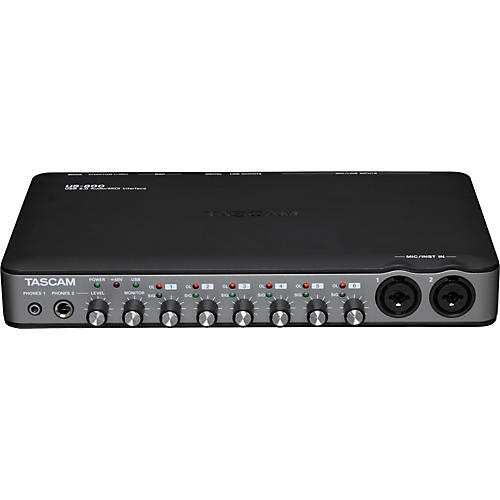
8 in x 4 out, 24-bit/96kHz interface that works as a standalone mic preamp.
The lightweight TASCAM US-800 interface adds great-sounding multichannel recording and MIDI to your laptop. With 8 inputs (6 analog, 2 digital) and 4 outputs (2 analog, 2 digital) for recording dynamic soundscapes and performances, the US-800 also has 6 XLR microphone inputs with phantom power for use with condenser mic. The TASCAM US-800 interface's premium 24-bit/96kHz converters capture every detail.
The US-800 also includes S/PDIF digital audio in and out as well as MIDI in and out for linking up to your studio. The rugged, lightweight I/O package is ideal for mobile or desktop recording. Other features include stereo RCA analog output for monitoring, standalone-only mode for use as a microphone preamp, and 1/4" and 1/8" stereo headphone outputs.
TASCAM bundles the US-800 USB interface with Cubase LE4 48-track recording software.
Features
- Provides 8 audio inputs and 4 audio outputs (two analog, two digital) plus one MIDI input and output for a Windows or Macintosh computer
- Can be used as a standalone microphone/instrument/line preamplifier
- Up to 96kHz sampling rates at 16/24-bit resolution for superb recording quality
- Built-in DSP mixer for flexible routing and monitor mixing
- 2 mic/instrument inputs with XLR/TRS combo connectors on front
- 4 mic/line inputs with XLR/TRS combo connectors on rear
- Stereo digital input and output (SPDIF, coaxial)
- 48-volt phantom power available on each mic input
- Input level control and signal/overload LEDs on each analog input
- Analog stereo output (RCA)
- 2 headphones outputs (3.5mm and 6.3mm)
- Separate controls for output level and headphones volume
- USB 2.0 equipped (also supports USB 1.1)
- Can be USB-powered
- Includes Cubase LE4 48-track recording software
Order a US-800 today for better mobile or desktop recording.
Great little interface.
| Review By: Ryan Benham | 1 month, 3 days ago2 people out of 2 found this review helpful
Pretty basic features.. 6 XLR connections with their own personal controls. Phantom power. Best you are going to get for the price..
I had bought a Focusrite Saphire 6 prior, but it had arrived DoA.. so after looking around I chose this item right here after careful research, and I don't regret my choice one bit.
Don't get me wrong, this is my first interface I've ever purchased, and first time setting up a home recording studio, so I'm in no way an expert.. here's my experience with the product thus far.
When I took it out of the package, I really liked the simple look it had. Seems well built, mostly made of plastic, but had a good weight.
Installation; read over all the instructions, followed the installation instructions exactly, and had absolutely no problems. Quick install, had it up and running in no time at all.
It's extremely easy to use, I have had 0 problems with this interface, I got this paired with the MXL 990/991 condenser mics, and I'm very happy with the quality of sound that I get from this product, at such a great price.
If you're interested in computer specs, this is what I'm running :
Windows 7 64-bit
Intel Core-2 Duo 2.13GHz
4 GB Ram
Creative EAX Advanced HD 4.0 audio card,
I was worried I would possibly run into some of the problems others have, but it was simply read instructions, install, and play. That simple, had no issues what so ever.
For the price, this is a steal. So happy that I chose to purchase this item.
As stated above, best bang for the buck in my opinion.
I suppose the only downfall is lack of features, but it does what I need it to do perfectly.
Not good with Cubase
| Review By: Graeme Swallow | 1 month, 4 days ago0 people out of 1 found this review helpful
This device worked great with the Cubase LE5 bundled software. Then I made the mistake of upgrading to Cubase 6 (full version). Totally unusable. Every time I launch Cubase, I get a message from Windows saying the US-800 suffered a failure and can no longer be recognized by Windows. AWESOME! Even got the blue screen of death with a message pointing the finger at the US-800 drivers. (And yes, I was completely up-to-date with the latest driver versions.)
So I email tech support and all the support people are out at the NAAM convention, so I have to wait a minimum of 5 days for help. SCREW THAT! Send sales people to a convention and keep your support people doing their job of SUPPORTING customers.
I'm returning my device and buying something other than Tascam.
mediocre
none
Not happy
Tascam US-800: forget linux
| Review By: Steve Franks | 1 month, 5 days ago0 people out of 0 found this review helpful
Looks like a nice unit, but whoever said it works on unix was flat wrong. Tried all linux kernels from 2.6.35 up to 3.1.18, and zero joy. This covers, for example, ubuntu versions 10.10 thru 11.10. Too lazy to send it back, probably gonna collect dust...
US-800 Review
| Review By: Nicholas Ramseyer | 1 month, 6 days ago1 people out of 2 found this review helpful
Get it on sale, then the value is great
This is the abridged version of a long speech I could go on about this product, in short it works great, but I would get it on sale since you may as well go with a tascam US-1800 if you can just spend a little more.
In short, all the nightmares about the drivers on the reviews here are true, anyone who got it to work must have a perfect computer setup since it literally is not a good time. After about a week of experimenting I came up with a way of making it work. Keep in mind I'm running windows 7 64 bit Service Pack 2, so I can't speak for any of the earlier versions of windows (XP, Vista,7)
So here's how I got it to work, literally don't touch the CD or website drivers for the device. Without the power plugged into the US-800 plug in the fire wire USB connection cable between your computer. Now plug in the power and windows 7 should automatically recognize the device and hunt down some drivers for it. Whatever it finds is what you want, and keep in mind that you will only be able to plug the US-800 into a USB port that has installed these. (Use USB 2.0 or you're going to have a bad time)
With this literally super easy way, I haven't encountered the freezing issue at all and the device has worked more than great! The only problems I have are with my DAW which is mixcraft 5, which has some issues recording all 6 channels (I have plenty of computing power).
An alternative is if you have a MAC, you should be ok if you install the drivers from the website and restart your computer. GarageBand seems to be able to recognize it and record without any problems.
You can also use it on an Ipad, but you need to buy the camera./ USB adaptor, and then a DAW program on the App store. Decently cheap if you have an Ipad and you don't have a DAW like mixcraft, Logic, Pro Tools, Garage Band, etc.
If your having troubles with it recognizing you can unplug and replug it back in to reset the device. I would always restart the computer before use as well, It seems to clean everything up and make it work better.
If you're completely new to multichannel recording with an audio interface, you probably want to purchase a better DAW than Cubase, mixcraft is a pretty good choice for being user friendly to begin with. (Cubase really isn't that great unless you have nothing else). It's also worth noting the way the device works it sends channel 1 to mono left, channel 2 to mono right, and so on for all 6 channels. Which means in a program like mixcraft you set each channel to only record from that mono direction, but your result will be in stereo in the end.
My abridged version turned out to be longer than expected.. best of luck though, it is a good little device for anyone starting out.
everything as promised
| Review By: je mcree | 1 month, 1 week ago
-
Best SellerSnark Clip-On Chromatic Guitar & Bass Tuner4.5 84 Reviews$19.99 - $29.99
- Save up to:
- $10.00 (33%)
-
Best SellerEvans EMAD 2 Clear Batter Head4.5 117 Reviews$32.00 - $47.99
- Save up to:
- $50.19 (60%)
-
SaleEpiphone Jack Casady Signature Bass Guitar4.5 40 Reviews$699.00
- Save up to:
- $633.00 (48%)
-
Top Rated
-
Best SellerMartin D15M Dreadnought Acoustic Guitar4.5 6 Reviews$1,149.00
- Save up to:
- $350.00 (23%)
-
Top Rated
-
Best SellerTakamine G Series G340 Acoustic Guitar4.0 9 Reviews$249.00
- Save up to:
- $150.00 (38%)