Why Shop With Us?
Free Shipping
Free Standard Ground shipping (48 contiguous states, some overweight and Used/Vintage items excluded).
Orders placed before 3 p.m. ET usually ship the same business day.
Learn More2-Year Free Warranty on Guitars
Every guitar or bass you purchase from Musician's Friend (electric or acoustic, New or Open Box) includes two years of protection from manufacturer defects.
Contact Us for DetailsWe're Here for You
Our Gear Advisers are available to guide you through your entire shopping experience. Call or Chat for expert advice and to hear the latest deals.
Contact UsContact Us
Hablamos Español
866.226.2919
Hours:
MON - FRI 6 AM – 7 PM PT
SAT 7 AM – 6 PM PT
SUN 8 AM – 5 PM PT


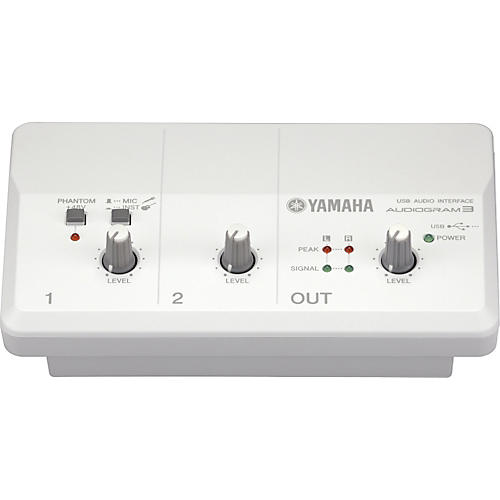
AUDIOGRAM3 Computer Recording System
false falseWe're sorry-this item is unavailable.
Contact our experts for a recommendation of great alternatives. Call us at 800-449-9128.
A computer-based recording system for all musical instruments!
This package will instantly turn your computer into a powerful yet intuitive tool for recording and editing audio from virtually any microphone or audio input device. What's more, setup is as easy as installing the bundled music-production application, CUBASE AI, on your computer and connecting the audio interface using the USB cable provided! You're then ready to connect instruments, microphones, CD players, MP3 players, and even old record or tape players for recording straight into CUBASE AI.
Streamlined audio interface
With a focus on simplicity and ease-of-use, the Yamaha AUDIOGRAM3 delivers a compact audio interface complete with both a mono and stereo input channel. Providing maximum flexibility for recording from almost any audio source, the mono input channel features a combo-type connector that can be set for microphone or line level input, while the stereo channel has both phone and RCA connectors. Of course, as this interface is USB bus-powered, it needs no external power supply and is an ideal solution for mobile applications.
High-quality microphone preamp
Also supporting microphone-level input, the AUDIOGRAM3 mono channel features a microphone preamp offering excellent audio quality. And should you want to connect a condenser microphone for higher-quality recordings, this channel can even be phantom powered. Regardless of what type of microphone you choose, however, the professionalmixer technologies integrated into this preamp will deliver perfect recordings every time.
Direct connection of electric guitars and basses
With one touch of the MIC/INST select button, you can set the sensitivity of the AUDIOGRAM3 mono channel for direct connection of either microphones or instruments. When set to instrument-level sensitivity, for example, you can directly record electric guitars, basses, and many other input devices. And all audio recorded using either of the MIC/INST settings can then be processed to give professional-sounding results using CUBASE AI's built-in effects.
Stereo channel for practically all sound input devices
With the AUDIOGRAM3, you also get a stereo input channel with both phone and RCA pin connectors that can be used to conveniently connect not only synthesizers, portable keyboards, and electronic pianos, but also a diversity of other sound sources such as CD players, MD players, portable audio players, and even old record and tape players. Providing maximum flexibility for many different recording situations, the AUDIOGRAM3 even supports simultaneous recording of the instrument or vocal on the mono channel with the audio being input via the stereo channel. For example, you could easily use this feature to record yourself playing along to a CD or MD backing track or singing to a karaoke track created on a portable keyboard.
NOTE: Go to http://www.yamahasynth.com/downloads to download the recommended Yamaha USB-AUDIO Driver.
Features
- Streamlined audio interface
- High-quality microphone preamp
- Provides direct connection of electric guitars and basses
- Stereo channel for practically all sound input devices
AUDIOGRAM3 Computer Recording System Specifications:
- Windows-based computer with built-in USB interface
- OS: Windows Vista
- CPU: 1GHz or better Intel Core / Pentium / Celeron processor
- Memory: More than 1GB
- Windows-based computer with built-in USB interface
- OS: Windows XP Professional / XP Home Edition
- CPU: 750MHz or better Intel Core / Pentium / Celeron processor
- Memory: More than 128MB
- Macintosh computer with built-in USB interface
- OS: Mac OS X 10.3.3 or higher
- CPU: Intel CPU / Macintosh G3 processor 300 MHz or better
- Memory: More than 128MB
- OS: Windows XP Professional SP1 / XP Home Edition SP1 / Windows Vista (32-bit)
- CPU: Intel Pentium 1.4GHz or better
- Available Memory: More than 512MB
- Hard Disk: Free disk space of 1GB or more
- Audio Interface: Windows DirectX / ASIO compatible
- OS: Mac OS X 10.4 or higher
- CPU: Power Mac G4 1GHz or Core Solo 1.5GHz or better
- Available Memory: More than 512MB
- Hard Disk: Free disk space of 1GB or more
- Free Standard Ground shipping (48 contiguous states, some overweight and Used/Vintage items excluded).
- Orders placed before 3 p.m. ET usually ship the same business day.
Every guitar or bass you purchase from Musician's Friend (electric or acoustic, New or Open Box) includes two years of protection from manufacturer defects.
Our Gear Advisers are available to guide you through your entire shopping experience. Call or Chat for expert advice and to hear the latest deals.

Musician's Friend Support