Why Shop With Us?
Free Shipping
Free Standard Ground shipping (48 contiguous states, some overweight and Used/Vintage items excluded).
Orders placed before 3 p.m. ET usually ship the same business day.
Learn More2-Year Free Warranty on Guitars
Every guitar or bass you purchase from Musician's Friend (electric or acoustic, New or Open Box) includes two years of protection from manufacturer defects.
Contact Us for DetailsWe're Here for You
Our Gear Advisers are available to guide you through your entire shopping experience. Call or Chat for expert advice and to hear the latest deals.
Contact UsContact Us
Hablamos Español
866.226.2919
Hours:
MON - FRI 6 AM – 7 PM PT
SAT 7 AM – 6 PM PT
SUN 8 AM – 5 PM PT


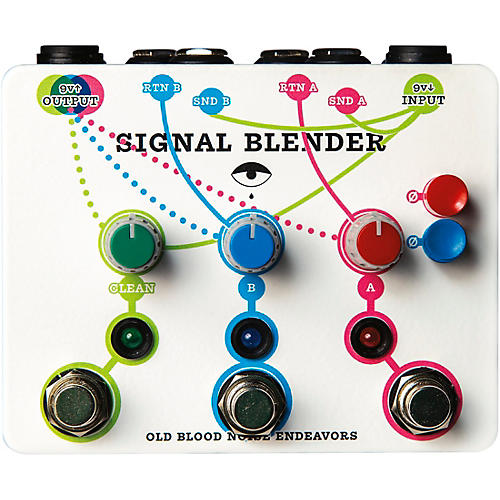
Signal Blender Switching Effects Pedal
false falseWe're sorry-this item is unavailable.
Contact our experts for a recommendation of great alternatives. Call us at 800-449-9128.
Gain extra control and versatility over your effects signal.
Footswitch A sends Input to Send A and Return A to Output through the A volume control.
Footswitch B sends Input to Send B and Return B to Output through the B volume control.
Footswitch Clean sends Input to Output through the Clean volume control.
The Red and Blue phase switches change the phase of the signal going to Send A (red) and Send B (blue).
With all footswitches off, the Signal Blender is true bypass, with Input going straight to Output.
Parallel Effects: to use Signal Blender as a parallel effect mixer, plug Send A into the input of an effect pedal and Return A into the output of the same pedal. Repeat with Send/Return B using a different pedal. Now you can blend effects in parallel by using the footswitches, and blend in your clean signal with the Clean footswitch. If the sounds in parallel are out of phase, use the corresponding red or blue phase switch to correct it.
3-to-1 Mixing: to use Signal Blender as an instrument mixer, plug instruments into Input, Return A, and Return B. Now the A, B, and Clean footswitches send the instruments to the output and the volume can be set with the corresponding volume knobs.
1-to-3 Splitting: to use Signal Blender as a splitter, plug an instrument into Input, and plug Send A, Send B, and main Output into three amplifiers. If the amplifiers are out of phase, use the corresponding red or blue phase switch to correct it.
Clean Boost: to use Signal Blender as a volume level setter, plug Send A straight to Return A and Send B straight to Return B. In this way, every switch will add a parallel copy of the Input signal and boost the volume.
Parallel Effect and 2-to-1 Mixer: to use Signal Blender as a different sort of parallel mixer, plug Send A into the input of an effect pedal and Return A into the output of the same pedal. Plug an additional instrument into Return B. Now with all switches engaged, your output will have your first instrument, an affected version of that instrument, and a second instrument all running in parallel.
There may be some more complicated implementations of Signal Blender. By using the simple rules from the intro, you can let your mind wander and find a number of new sonic solutions.
Note: the footswitches can be latching or momentary based on how long they are held. Simply tap for latching on/off operation or hold for momentary on/off operation.
The Signal Blender uses standard 9V center negative power, and has a current draw of 31 mA. A courtesy power outlet is available in order to power an additional pedal using the same supply as Signal Blender.
Call or click to order today!
Signal Blender Switching Effects Pedal Specifications:
- Power requirement: 9V DC, center negative
- Draw: 31mA
- Includes pedal power output
- Free Standard Ground shipping (48 contiguous states, some overweight and Used/Vintage items excluded).
- Orders placed before 3 p.m. ET usually ship the same business day.
Every guitar or bass you purchase from Musician's Friend (electric or acoustic, New or Open Box) includes two years of protection from manufacturer defects.
Our Gear Advisers are available to guide you through your entire shopping experience. Call or Chat for expert advice and to hear the latest deals.

Musician's Friend Support